Show original
Try the app

請求書・見積書作成ツール
Enjoyed this article?
Support Shunsuke Kinjo
Share
AI translation
We are introducing the apps published on Tsukutta one by one. The second one is a web app called "Invoice and Quotation Creation Tool" for sole proprietors, freelancers, and small companies. It handles everything in one workflow, from customer registration to quotations, invoices, PDF output, payment recording, and receipt issuance. Reason for creating it: I saw...
Try the app
請求書・見積書作成ツール
Enjoyed this article?
Support Shunsuke Kinjo
I'm introducing the apps published on Tsukutta one by one. The second one is a web app called "Invoice and Quotation Creation Tool" designed for sole proprietors, freelancers, and small companies. It handles everything in one workflow—from customer registration through quotations, invoices, PDF output, payment recording, and receipt issuance.
Quotations and invoices are documents you can create with just a template. However, in practice, you end up rewriting the same information repeatedly—copying customer addresses and bank transfer details each time, re-entering quotation line items into invoices, and so on. When multiple tax rates and discounts are involved, verifying amounts becomes tedious, and payment status often ends up being tracked in a separate spreadsheet.
So rather than creating a tool for making documents one at a time, I built it as a tool that connects and manages the entire flow: "quotation → invoice → payment → receipt."
The target users are sole proprietors, freelancers, small companies, design firms, and staff members who regularly send quotations and invoices to the same clients each month.
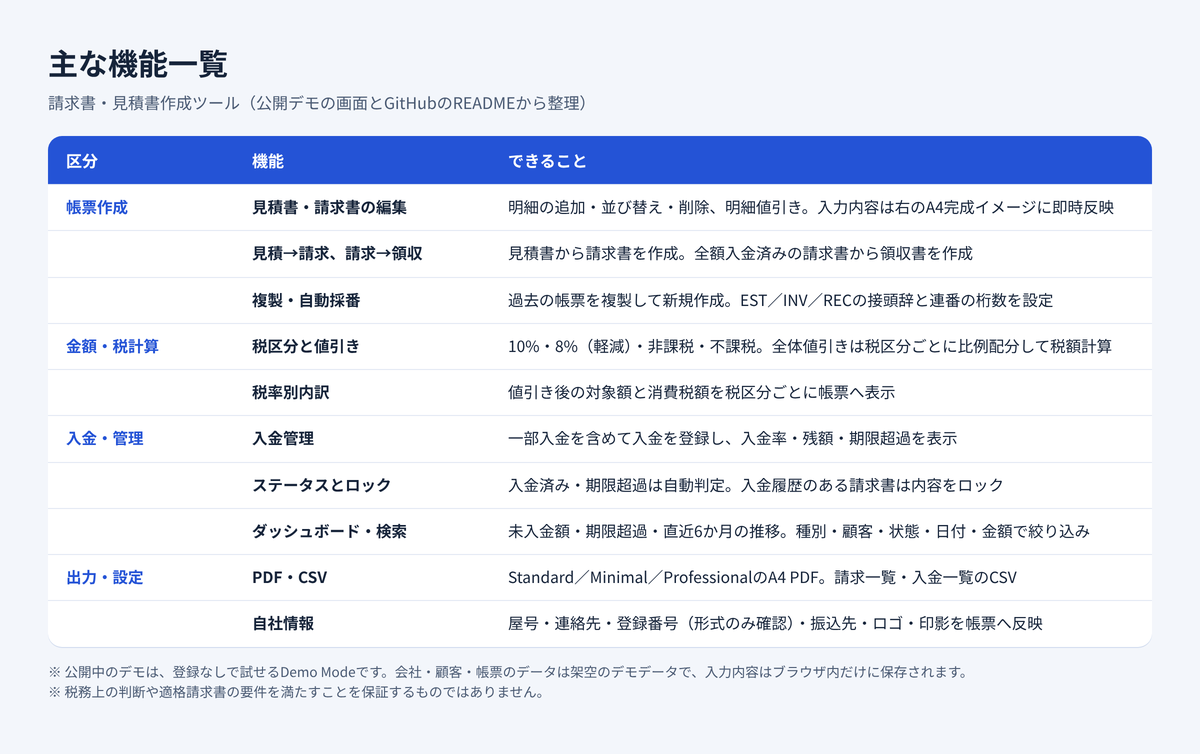
The features are divided into four categories: document creation, amount and tax calculation, payment management, and output and settings.
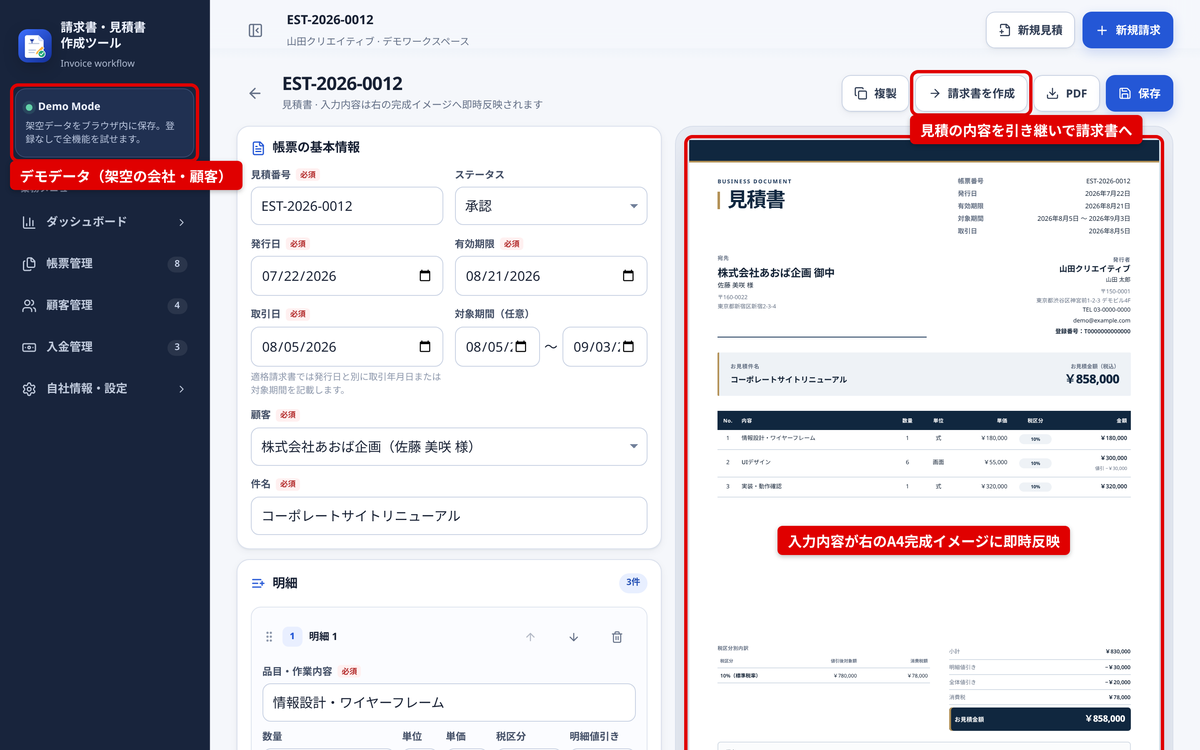
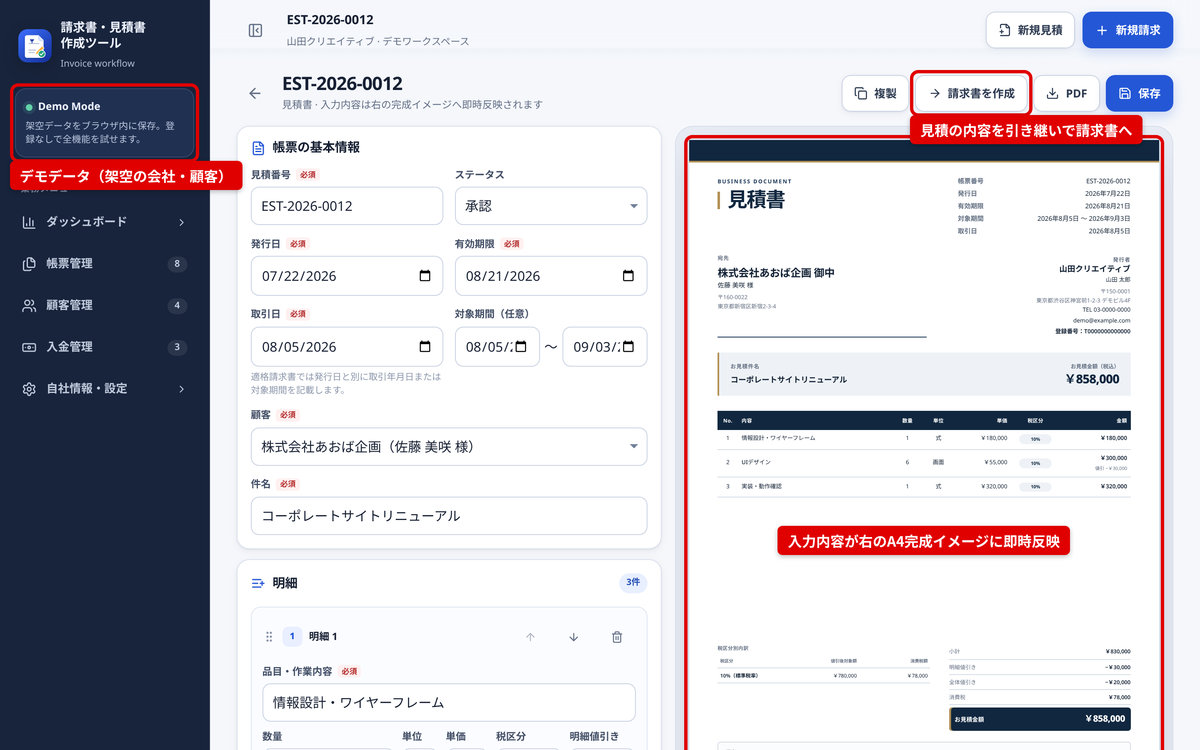
I put particular effort into the editing screen, which lets you input and verify the final result simultaneously. As you enter line items, discounts, and tax classifications on the left side, the A4 preview on the right updates instantly. The tool distinguishes between 10%, 8% (reduced tax rate), non-taxable, and tax-exempt categories, displaying both the target amount and consumption tax for each classification on the document.
First, you register a customer and create a quotation. From the quotation screen, clicking "Create Invoice" generates an invoice that carries over the customer, subject, line items, and amounts. You can choose from Standard, Minimal, or Professional templates and download as an A4 PDF.
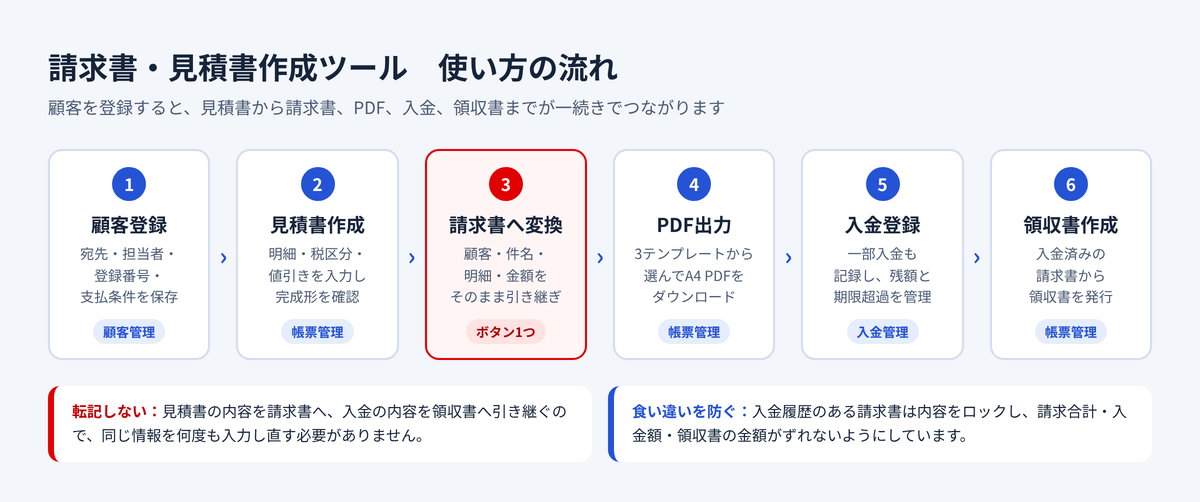
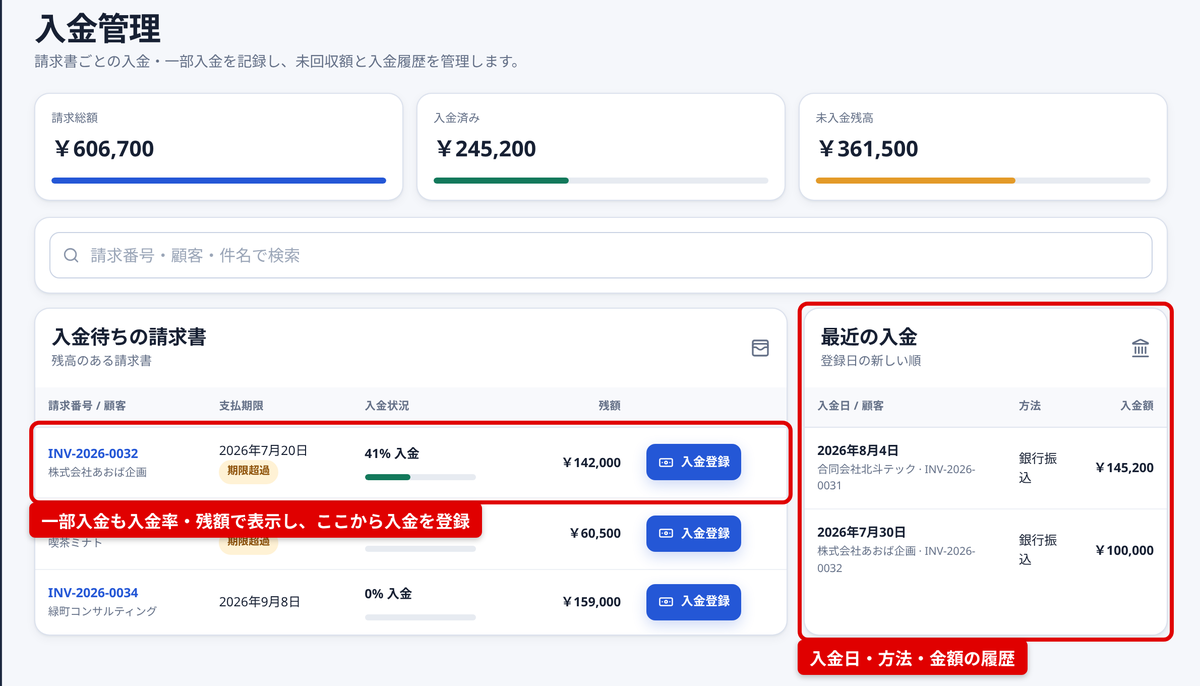
For payments, you register the payment date, amount, and method for each invoice. Even if only a partial payment is received, the payment rate and remaining balance show the status clearly. Once an invoice is fully paid, you can create a receipt that carries over the payment information.
The demo currently available is a Demo Mode that requires no registration. All company, customer, and document data are fictional demo data. Edited content is saved only in that browser and never sent to the server. You can also reset to the initial data from the settings screen.
Development proceeds using AI-driven development with an AI coding agent. The tech stack includes Next.js 16.3 (App Router, static export), React 19.2, and TypeScript 5.9, with Recharts for graphs, html2canvas and jsPDF for PDF output, and Vitest and Testing Library for testing.
Since this tool handles money, I separated calculation logic from the UI. Amounts are handled as integers in yen, and calculations for subtotals, discount allocation, tax amounts, quotation-to-invoice conversion, and status transitions are written as TypeScript functions separate from the UI and verified through tests. Invoices with payment history are locked to prevent content changes, ensuring invoice amounts, payment amounts, and receipt amounts never diverge.
In the details, I've included safeguards against Excel treating CSV values starting with "=" as formulas, and pre-checks to prevent documents that don't fit on A4 from being output as incomplete PDFs. According to QA records from August 9, 2026, all commands run together—ESLint, type checking, tests (9 files, 62 cases), and production builds (npm run verify)—pass successfully.
I also compiled work for portfolio inclusion into instruction documents passed to Codex and Claude Code. I specified that only verified features, technologies, and actual screenshots be included, with no fictional achievements or placeholder URLs.
I'm also available for consultation on similar business app development.
Portfolio: https://kj-web-app-portfolio.web.app/
Tsukuttaで公開しているアプリを、1本ずつ紹介していきます。2本目は、個人事業主やフリーランス、小規模な会社向けのWebアプリ「請求書・見積書作成ツール」です。顧客の登録から見積書、請求書、PDF出力、入金の記録、領収書の発行までを、ひとつの流れで扱えます。
見積書や請求書は、テンプレートさえあれば作れる書類です。ただ、実際には顧客の住所や振込先を毎回書き写したり、見積書の明細を請求書へ打ち直したりと、同じ情報の転記が何度も発生します。複数の税率や値引きが混ざると金額の確認にも手間がかかり、入金されたかどうかは別の表で管理する、ということも起こりがちです。
そこで、書類を1枚ずつ作る道具ではなく、「見積 → 請求 → 入金 → 領収」をつなげて管理できるツールとして作りました。
想定しているのは、個人事業主・フリーランス、小規模な会社や制作会社、毎月同じ取引先に見積・請求を行う担当者です。
機能は、帳票作成、金額・税計算、入金・管理、出力・設定の4つに分かれています。
特に力を入れたのは、入力と完成形の確認を同時に進められる編集画面です。左側で明細や値引き、税区分を入力すると、右側のA4の完成イメージにすぐ反映されます。10%・8%(軽減税率)・非課税・不課税を区分し、税区分ごとの対象額と消費税額も帳票に表示します。
まず顧客を登録し、見積書を作ります。見積書の画面から「請求書を作成」を押すと、顧客・件名・明細・金額を引き継いだ請求書ができます。テンプレートをStandard・Minimal・Professionalから選び、A4のPDFとしてダウンロードできます。
入金は、請求書ごとに入金日・金額・方法を登録します。一部だけ入金された請求書も、入金率と残額で状況が分かります。全額入金された請求書からは、入金の情報を引き継いだ領収書を作成できます。
公開中のデモは、登録不要のDemo Modeです。会社・顧客・帳票はすべて架空のデモデータで、編集した内容はそのブラウザの中だけに保存され、サーバーには送信されません。設定画面から初期データに戻すこともできます。
開発は、AIコーディングエージェントを使うAI駆動開発で進めています。技術スタックは Next.js 16.3(App Router、静的書き出し)、React 19.2、TypeScript 5.9 で、グラフに Recharts、PDF出力に html2canvas と jsPDF、テストに Vitest と Testing Library を使っています。
お金を扱うツールなので、計算の正しさを画面から切り離しました。金額は円単位の整数で扱い、小計・値引きの配分・税額の計算や、見積から請求への変換、ステータスの移り変わりは、TypeScriptの関数として画面とは別に書き、テストで確かめています。入金履歴のある請求書は内容を変更できないようにロックし、請求額と入金額、領収書の金額がずれないようにしました。
細かい点では、CSVの先頭が「=」などで始まる値をExcelで数式として扱わせない対策や、A4に収まらない帳票を欠けたままPDFにしないための事前チェックも入れています。2026年8月9日のQA記録では、ESLint・型チェック・テスト(9ファイル・62件)・本番ビルドをまとめて実行するコマンド(npm run verify)がすべて通っています。
ポートフォリオに掲載する作業も、Codex や Claude Code に渡す指示書にまとめました。実装を確認できた機能・技術・実在のスクリーンショットだけを載せ、架空の実績や仮のURLを書かないよう指定しています。
同じような業務アプリの制作もご相談ください。
制作実績はこちら:https://kj-web-app-portfolio.web.app/

