Show original
Try the app

保守・点検管理システム
Enjoyed this article?
Support Shunsuke Kinjo
Share
AI translation
We will introduce the apps we are publishing on Tsukutta one by one. The first one is a web-based business system called "Maintenance and Inspection Management System" that comprehensively manages inspections and repairs of air conditioning units, servers, manufacturing equipment, refrigeration facilities, store equipment, and more. Why we created it: While we were able to prepare schedules and checklists for equipment inspections…
Try the app
保守・点検管理システム
Enjoyed this article?
Support Shunsuke Kinjo
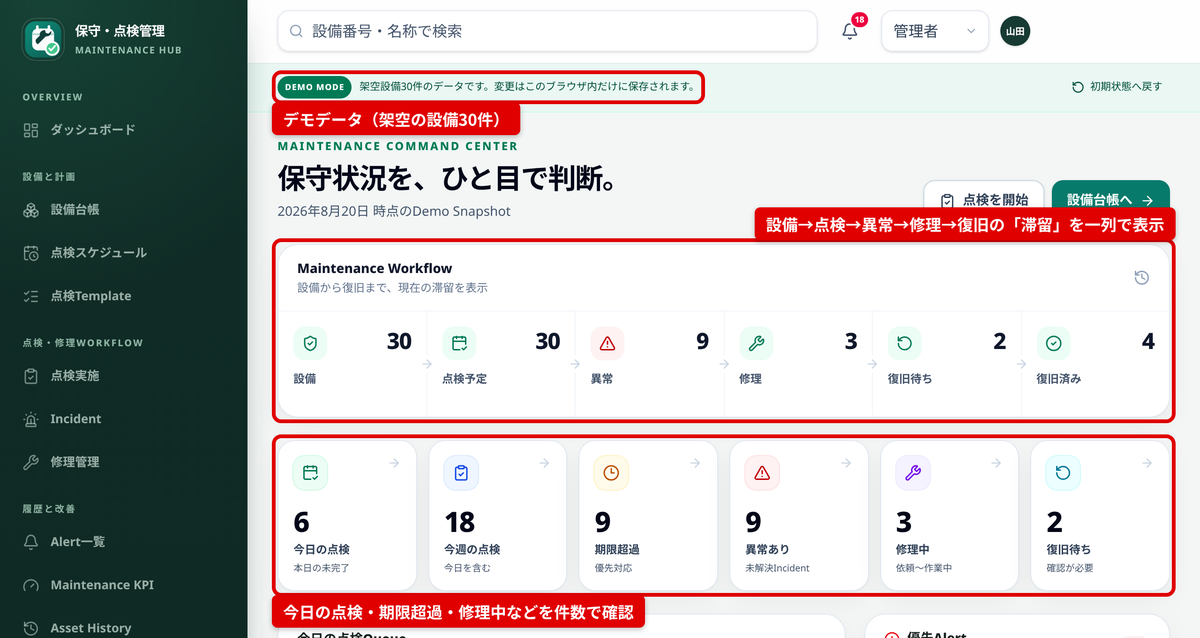
We are introducing the apps published on Tsukutta one by one. The first one is a web-based operations system called "Maintenance and Inspection Management System" that consolidates the management of inspections and repairs for air conditioning units, servers, manufacturing equipment, refrigeration facilities, store equipment, and more.
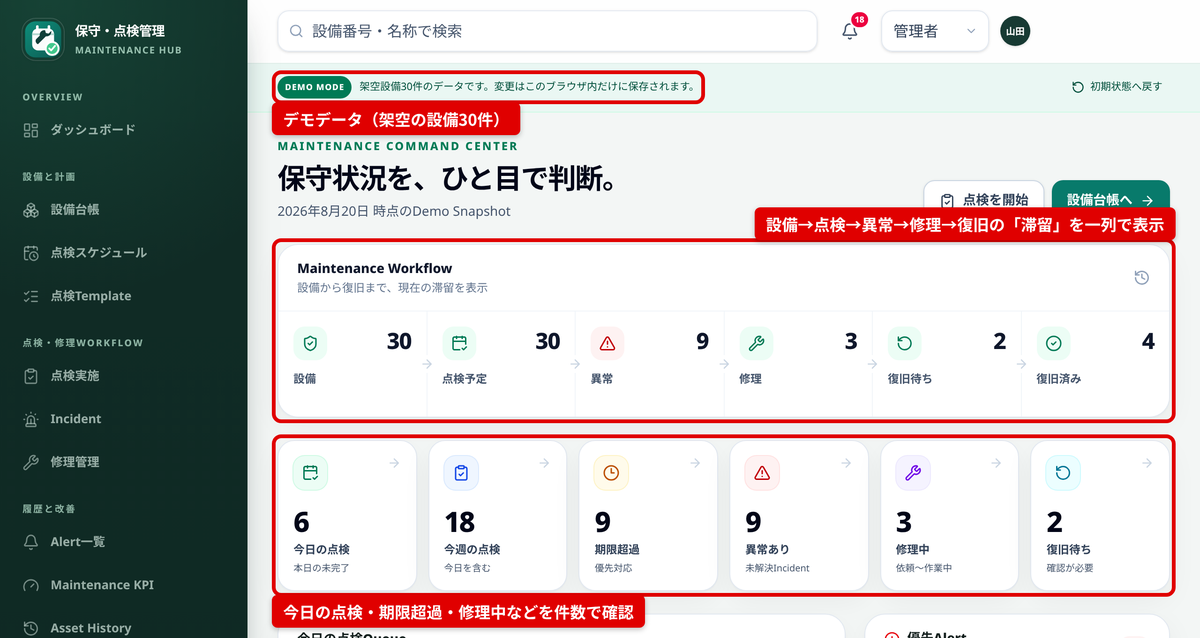
Equipment inspection is a task where preparation—such as creating schedules and checklists—is often completed, but the follow-up work tends to be disconnected. When an inspection finds an abnormality, repair requests are made through separate communication channels, and you have to ask the person in charge to find out whether repairs have been completed. Before you know it, there's often no record of which equipment was down and for how long.
So rather than stopping at a "list of scheduled inspections," we built a system that handles the entire flow in one continuous process: from equipment registration through inspection, abnormality detection, repair, confirmation of restoration, and historical review.
The target users are equipment managers, maintenance staff, and their supervisors at companies that operate multiple locations or manage multiple pieces of equipment.
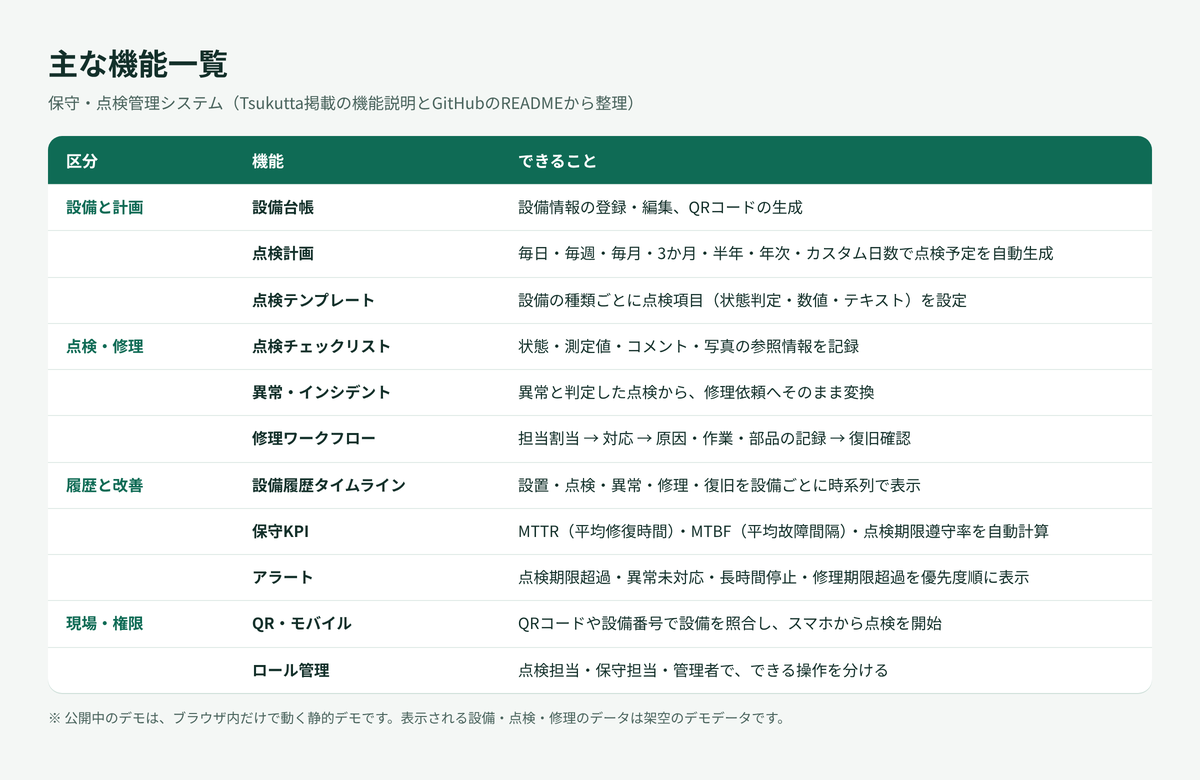
The features are divided into four categories: equipment and planning, inspection and repair, history and improvement, and site and permissions.
We put particular effort into the ability to convert an abnormality determination from an inspection directly into an incident record (abnormality log) within the same workflow. Since the equipment, inspection items, measured values, and comments are carried over, the effort required to arrange repairs is reduced.
An administrator registers equipment and sets the inspection cycle, and inspection schedules are automatically generated. Inspection staff enter checklist data on a smartphone or PC, and if an abnormality is found, they proceed to repairs.
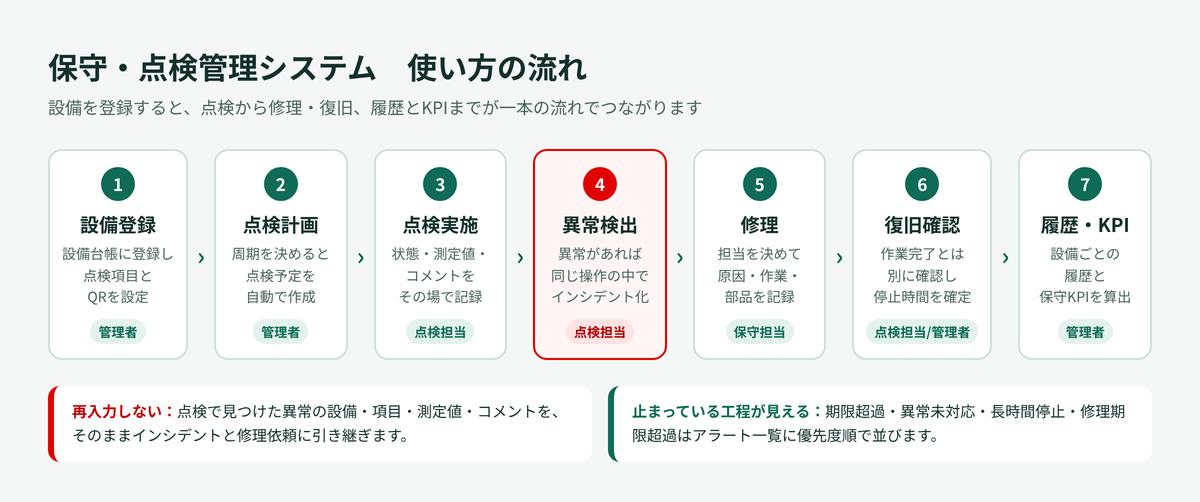
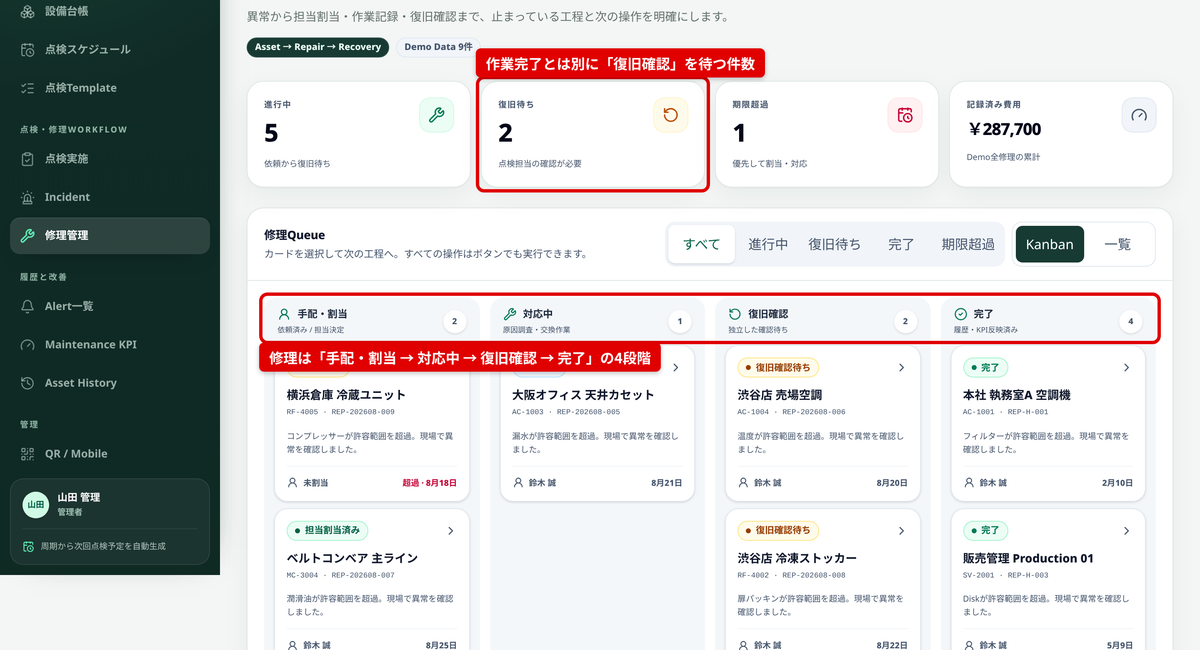
Repairs progress through four stages: "Scheduling and Assignment → In Progress → Restoration Confirmation → Complete." By separating the maintenance staff's "work completed" from the inspection staff's or administrator's "restoration confirmation," we prevent discrepancies where something appears to be fixed but actually isn't.
From repair records confirmed through restoration, the system automatically calculates maintenance KPIs such as MTTR (Mean Time To Repair), MTBF (Mean Time Between Failures), and inspection deadline compliance rate.
The demo currently available runs on demo data with 30 fictional pieces of equipment. It operates entirely within the browser, changes are saved within that browser session, and you can reset to the initial state from the screen.
Development is proceeding using AI-driven development with an AI coding agent. The technology stack includes Next.js 16.3 (App Router), React 19.2, TypeScript 5.9, Tailwind CSS 4.3, and testing with Vitest. The application is statically exported and published on Vercel.
We separated the parts delegated to AI from the parts that must work exactly as specified. Inspection cycle calculations, state transitions that prevent skipping repair stages, and permission checks are written as regular code in the TypeScript domain layer and verified with tests. For example, a monthly inspection starting on January 31st progresses as "February 28th → March 31st," and even if an inspection is delayed, the next scheduled inspection returns to the original schedule.
Next.js 16 has some differences from how the AI was trained. For this reason, we placed a rule in the repository's AGENTS.md file stating "read the included documentation before implementation" to prevent the AI agent from implementing using outdated patterns. For final review, we verify ESLint, type checking, tests, and production builds all together with a single command (npm run verify). As of the August 20, 2026 record, 8 files and 63 tests and builds are passing. Portfolio work is also compiled into instruction documents for Codex, with specifications to match item counts and image names to actual files.
We also welcome inquiries about creating similar business applications.
See our portfolio here: https://kj-web-app-portfolio.web.app/
Tsukuttaで公開しているアプリを、1本ずつ紹介していきます。1本目は、空調やサーバー、製造機械、冷蔵設備、店舗設備などの点検と修理をまとめて管理するWeb業務システム「保守・点検管理システム」です。
設備の点検は、予定表やチェック表を用意するところまではできていても、その先がつながりにくい業務です。点検で異常が見つかると、修理の依頼は別の連絡手段で行い、修理が終わったかどうかは担当者に聞かないと分からない。気づくと、どの設備がどれだけ止まっていたのかも記録に残っていない、ということが起こりがちです。
そこで、「点検予定の一覧」で終わらせず、設備の登録から点検、異常の発見、修理、復旧の確認、履歴と振り返りまでを一本の流れで扱えるシステムとして作りました。
想定しているのは、複数の拠点や設備を抱える企業の設備管理担当、保守担当、その管理者です。
機能は、設備と計画、点検・修理、履歴と改善、現場・権限の4つに分かれています。
特に力を入れたのは、点検で異常と判定したときに、同じ操作の中でそのままインシデント(異常の記録)に変えられる点です。設備・点検項目・測定値・コメントが引き継がれるので、修理の手配までの手間が少なくなります。
管理者が設備を登録して点検の周期を決めると、点検予定が自動で作られます。点検担当がスマホやPCでチェックリストを入力し、異常があれば修理へ進みます。
修理は「手配・割当 → 対応中 → 復旧確認 → 完了」の4段階で進みます。保守担当の「作業完了」と、点検担当または管理者の「復旧確認」を分けているので、直したつもりで実は直っていなかった、という食い違いを防げます。
復旧まで確認できた修理の記録から、MTTR(平均修復時間)やMTBF(平均故障間隔)、点検期限の遵守率といった保守KPIを自動で計算します。
公開中のデモは、架空の設備30件を使ったデモデータで動いています。ブラウザの中だけで動作し、変更はそのブラウザ内に保存され、画面から初期状態に戻せます。
開発は、AIコーディングエージェントを使うAI駆動開発で進めています。技術スタックは Next.js 16.3(App Router)、React 19.2、TypeScript 5.9、Tailwind CSS 4.3、テストは Vitest で、静的書き出ししたものを Vercel で公開しています。
AIに任せる部分と、決まった通りに動かす部分を分けました。点検周期の計算や、修理の工程飛ばしを防ぐ状態遷移、権限のチェックは、TypeScriptのドメイン層に通常のコードとして書き、テストで確かめています。たとえば1月31日起点の月次点検は「2月末 → 3月31日」と進み、点検が遅れても次の予定が元のスケジュールに戻るようにしています。
Next.js 16は、AIが学習した頃の書き方と変わっている部分があります。そのため、リポジトリの AGENTS.md に「実装の前に同梱のドキュメントを読む」というルールを置き、AIエージェントが古い書き方で実装しないようにしました。仕上げでは、ESLint・型チェック・テスト・本番ビルドを1つのコマンド(npm run verify)でまとめて確認しています。2026年8月20日の記録では、8ファイル・63件のテストとビルドが通っています。ポートフォリオに載せる作業もCodex向けの指示書にまとめ、件数や画像名を実際のファイルに合わせるよう指定しました。
同じような業務アプリの制作もご相談ください。

