Show original
Enjoyed this article?
Support Lily
Share
AI translation
「毎回ゼロから説明」をやめた話
Enjoyed this article?
Support Lily
Claude Code forgets across sessions. Every time I open a new session, I have to re-explain the project background, past decisions, and my preferences. After continuing this for several months, I settled on a design that divides memory into 4 layers based on freshness and audience, rather than "writing everything in a single memo."
In this article, I'll write about the design, implementation, and operational pitfalls I encountered with this 4-layer architecture. At the end, I'll include a "minimum configuration you can replicate in 30 minutes today," so even if you don't read everything, you can take away just that part.
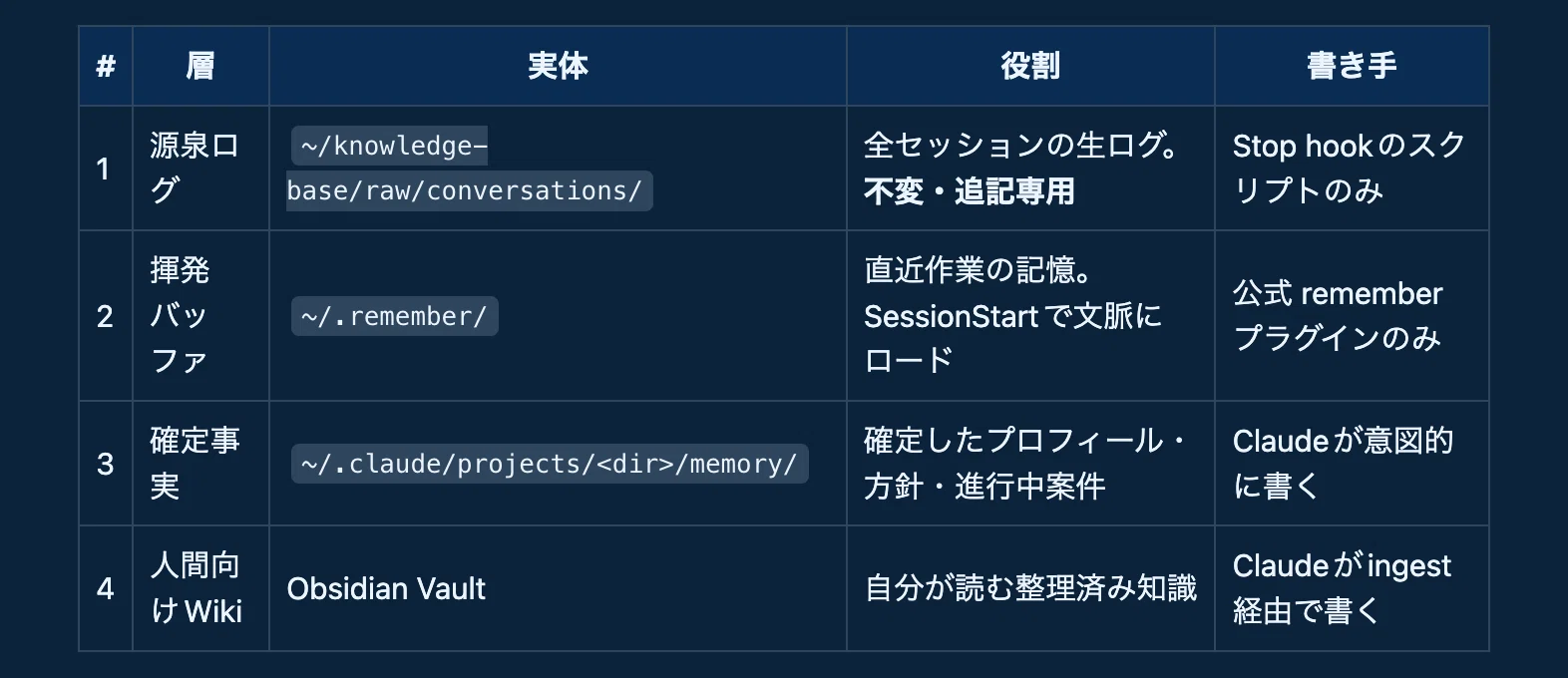
When people say "I want Claude Code to have memory," the contents actually mix 4 different types with different properties.
When you mix these into one file, raw logs bury preferences, and old work notes contaminate current decisions. So I separated the layers and fixed the "subject allowed to write" to one per layer.
 The flow is one-directional.
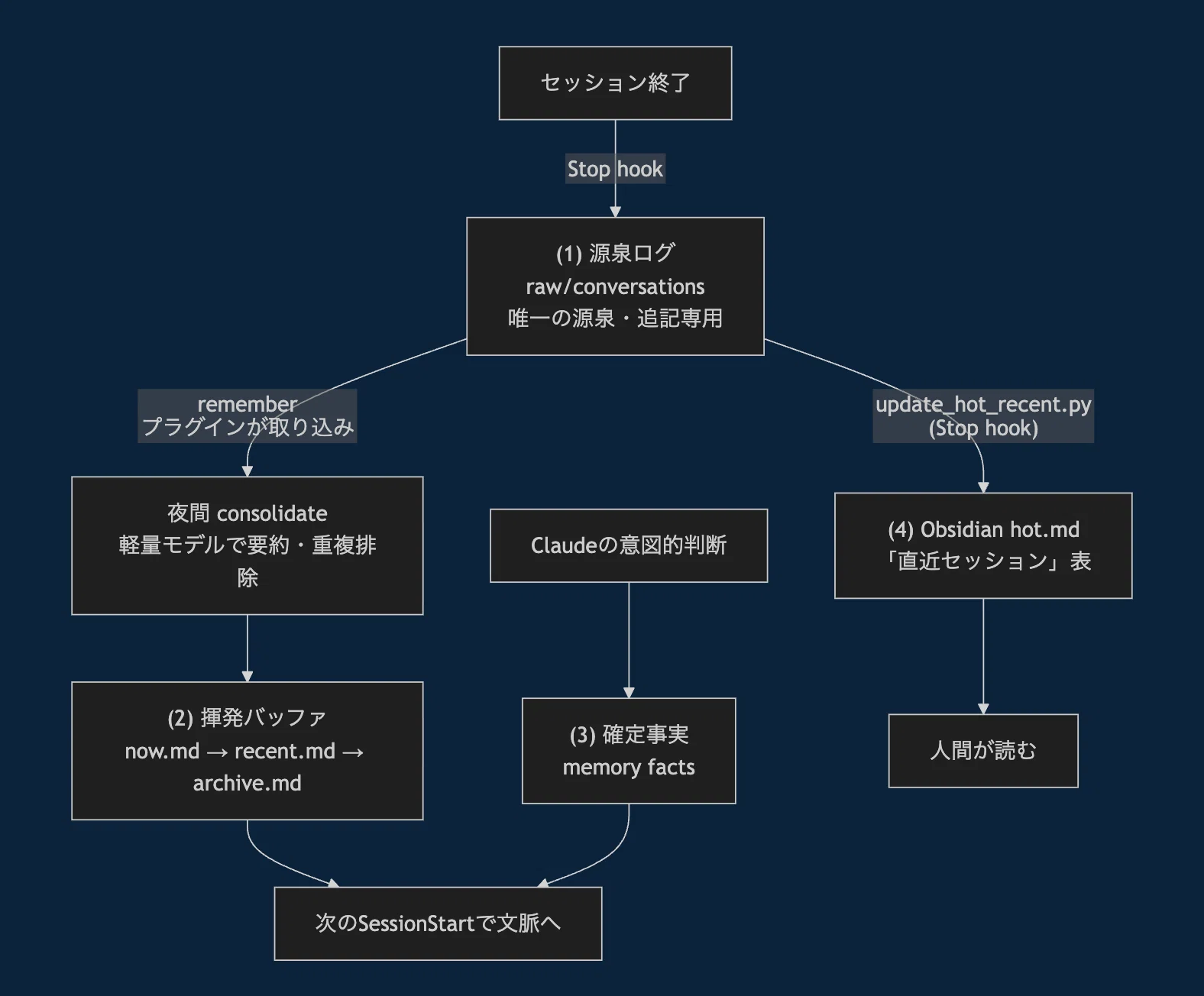 One-way flow diagram of the 4-layer architecture
There's only one principle. Downstream never overwrites upstream. Authority always lies in layer (1), and (2)(3)(4) are derivatives from it. If discrepancies arise, we correct them against (1).
Claude Code leaves the full session text as JSONL under ~/.claude/projects/. I convert this to Markdown via a Stop hook (fires at session end) and drop it into an append-only directory.
settings.json (excerpt):
{
  "hooks": {
    "Stop": [
      {
        "matcher": "",
        "hooks": [
          { "type": "command",
            "command": "python3 ~/knowledge-base/extract_conversations.py" }
        ]
      }
    ]
  }
}
The conversion script skeleton (extract_conversations.py key points only):
#!/usr/bin/env python3
"""Claude Code会話ログをknowledge base用のMarkdownに変換する"""
import json
from pathlib import Path
PROJECTS_DIR = Path.home() / ".claude" / "projects"
RAW_DIR = Path.home() / "knowledge-base" / "raw" / "conversations"
def parse_session(jsonl_path):
    messages = []
    with open(jsonl_path, encoding="utf-8") as f:
        for line in f:
            obj = json.loads(line)
            if obj.get("type") not in ("user", "assistant"):
                continue
            # user/assistantのテキストだけ抽出(tool_resultは捨てる)
            ...
    return messages
Two key points. Discard toolresult (tool execution results) — they explode in volume and you don't read them later. And name the output file as <projectname><sessionid>.md so you can later grep "when did I do that task?"
Layer (2) is delegated to the official remember plugin. Recent work goes into now.md, and through nightly consolidate it matures from recent.md → archive.md while deduplicating, and automatically loads into context at SessionStart.
⚠️ Layer (2) files are forbidden from manual editing. Touching them breaks consolidate.
Layer (3) is a place to put "confirmed facts only." Use MEMORY.md as an index, write facts one topic per file. Things like "this project's DB is Turso," "confirm before dangerous operations" — only information that doesn't decay goes here. The trick is not mixing in work logs.
The hot.md on the Obsidian Vault side automatically gets a "table of last 10 sessions." The mechanism is simple — just parse the filenames and datetime lines from layer (1) with regex, and inject the table into a marker-enclosed region. No LLM calls, so cost is zero.
hot.md (image of injection region):
<!-- recent:start auto-updated by update_hot_recent.py -->
| 日時 | プロジェクト | 最初の指示 |
|---|---|---|
| 2026-06-10 09:12 | my-app | レスポンシブ崩れを直して |
<!-- recent:end -->
💡 Making the "auto region" explicit with markers is subtly important. Without this, the human (me) might accidentally hand-edit it, breaking the next injection.
This was the biggest gotcha. When I ran the nightly auto job with launchd, writes only to the Vault under ~/Documents silently failed. No error messages.
After isolating, bash writes work even under launchd, but only the claude binary, git, and python get blocked. The cause was macOS TCC (privacy protection) — ~/Documents, ~/Desktop, ~/Downloads are regions that require Full Disk Access per binary to write to.
Rather than going around adding FDA, moving the write destination outside protected regions is more robust (works even if binaries update or paths change). I moved the Vault's actual location outside ~/Documents and put a symlink in the original place.
Layer (2)'s recent.md (for LLM) and layer (4)'s hot.md (for humans) have overlapping content. It looks redundant and you want to unify, but both originate from layer (1), just with different audiences. Making one canonical and the other subordinate causes format requirements to collide, making both harder to use. Leaving it redundant is the right answer.
Auto pipelines fail silently. Deciding on early warning signals helps you catch them.
We bundled these into one health check script so we can confirm the vitality of all layers with one command.
You don't need all 4 layers. Layer (1) alone is effective.
That's it. Now "all sessions are grep-able text." Being able to pull up "how did I fix that last week?" with grep -r "responsive" ~/knowledge-base/raw/ works better than you'd imagine. Layers (2)~(4) can be added later once the raw logs accumulate and you feel the inconvenience.
This environment also has auto-skills operations where Claude grows by writing its own skills, and a pipeline that auto-crawls GitHub every morning to pick up useful OSS. I plan to write about it in a follow-up, so I'd be happy if you'd follow!
Lily (@bokuwalily) — Individual developer. Building automation infrastructure with Claude Code while mass-producing iOS apps and web services
◼︎ Apps I've made are summarized at **ポートフォリオ**📱
◼︎ New releases and development behind-the-scenes on X **@bokuwalily**🐦
◼︎ OSS: **github.com/bokuwalily**🐙
Your ❤️ and shares are my motivation!
Claude Codeはセッションを跨ぐと忘れます。新しいセッションを開くたびに、プロジェクトの背景・過去に決めたこと・自分の好みを説明し直す。これを数ヶ月続けた結果、「記憶を1つのメモに全部書く」のではなく、鮮度と読み手で4層に分ける設計に落ち着きました。
この記事では、その4層アーキテクチャの設計・実装・運用して踏んだ落とし穴を書きます。最後に「今日30分で真似できる最小構成」を置いておくので、全部読まなくてもそこだけ持ち帰ってもらえれば十分です。
「Claude Codeに記憶を持たせたい」と一口に言っても、中身は性質の違う4種類が混ざっています。
これを1ファイルに混ぜると、生ログが好みを埋もれさせ、古い作業メモが今の判断を汚染します。そこで層を分け、層ごとに「書いてよい主体」を1つに固定しました。
流れは一方向です。
4層アーキテクチャの一方向フロー図
原則は1つだけ。下流は上流を上書きしない。 権威は常に層(1)で、(2)(3)(4)はそこからの派生です。食い違いが起きたら(1)に照らして直します。
Claude Codeはセッションの全文を ~/.claude/projects/ 配下にJSONLで残しています。これをStop hook(セッション終了時に発火するhook)でMarkdownに変換し、追記専用ディレクトリに落とします。
settings.json(抜粋):
{
  "hooks": {
    "Stop": [
      {
        "matcher": "",
        "hooks": [
          { "type": "command",
            "command": "python3 ~/knowledge-base/extract_conversations.py" }
        ]
      }
    ]
  }
}
変換スクリプトの骨子(extract_conversations.py の要点だけ抜粋):
#!/usr/bin/env python3
"""Claude Code会話ログをknowledge base用のMarkdownに変換する"""
import json
from pathlib import Path
PROJECTS_DIR = Path.home() / ".claude" / "projects"
RAW_DIR = Path.home() / "knowledge-base" / "raw" / "conversations"
def parse_session(jsonl_path):
    messages = []
    with open(jsonl_path, encoding="utf-8") as f:
        for line in f:
            obj = json.loads(line)
            if obj.get("type") not in ("user", "assistant"):
                continue
            # user/assistantのテキストだけ抽出(tool_resultは捨てる)
            ...
return messagesポイントは2つ。tool_result(ツール実行結果)は捨てること(量が爆発する割に後から読まない)。そして出力ファイル名を <プロジェクト名>_<セッションID>.md にして、後からgrepで「あの作業いつやったっけ」を引けるようにすることです。
層(2)は公式の remember プラグインに任せています。直近の作業が now.md に入り、夜間のconsolidateで recent.md → archive.md へ熟成されつつ重複排除され、SessionStartで自動的に文脈へロードされます。
⚠️ 層(2)のファイルは手編集禁止です。手で触るとconsolidateが壊れます。
層(3)は「確定した事実だけ」を置く場所です。MEMORY.md を索引にして、1トピック1ファイルで事実を書く。「このプロジェクトのDBはTurso」「危険な操作は実行前に確認を取る」のような、腐らない情報だけをここに入れます。作業ログを混ぜないのがコツです。
Obsidian Vault側の hot.md には「直近10セッションの表」が自動で入ります。仕組みは単純で、層(1)のファイル名と日時行を正規表現でパースし、マーカーで囲った領域に表を注入するだけ。LLMを呼ばないのでコストはゼロです。
hot.md(注入領域のイメージ):
<!-- recent:start auto-updated by update_hot_recent.py -->
| 日時 | プロジェクト | 最初の指示 |
|---|---|---|
| 2026-06-10 09:12 | my-app | レスポンシブ崩れを直して |
<!-- recent:end -->
💡 マーカーで「自動領域」を明示するのは地味に重要です。これがないと人間(自分)がうっかり手編集して、次回の注入が壊れます。
これが最大のハマりでした。夜間の自動ジョブをlaunchdで回したところ、**~/Documents 配下のVaultへの書き込みだけが静かに失敗**。エラーも出ません。
切り分けると、launchd配下でも bash の書き込みは通るのに、claude バイナリ・git・python だけが弾かれる。原因はmacOSのTCC(プライバシー保護)で、~/Documents ~/Desktop ~/Downloads はバイナリ単位のFull Disk Accessがないと書けない領域でした。
対策はFDAを付与して回るより、書き込み先を保護領域の外に出す方が堅牢です(バイナリが更新されてもパスが変わっても効く)。Vaultの実体を ~/Documents の外へ移設し、元の場所にはsymlinkを張りました。
層(2)の recent.md(LLM用)と層(4)の hot.md(人間用)は内容が被ります。一見冗長で統合したくなりますが、読み手が違うだけで両方とも層(1)由来。どちらかを正にして他方を従わせると、フォーマット要件が衝突して両方使いにくくなります。冗長なまま放置が正解でした。
自動パイプラインは静かに止まります。早期警告のシグナルを決めておくと拾えます。
うちではこれを1本のヘルスチェックスクリプトにまとめ、全層の死活を1コマンドで確認できるようにしています。
4層全部はいりません。層(1)だけで効果があります。
これだけで「全セッションがgrep可能なテキスト」になります。「先週どう直したっけ」が grep -r "レスポンシブ" ~/knowledge-base/raw/ で引けるのは、想像以上に効きます。層(2)〜(4)は、その生ログが溜まって不便を感じてから足せば間に合います。
この環境には他にも、Claudeが自分でスキルを書いて成長するauto-skills運用や、毎朝GitHubを自動巡回して有用OSSを拾うパイプラインが乗っています。続編で書く予定なので、興味があればフォローしてもらえると嬉しいです。
Lily(@bokuwalily)― 個人開発者。Claude Code で自動化基盤を組みながら、iOSアプリやWebサービスを量産しています
◼︎作ったアプリは **ポートフォリオ** にまとめています📱
◼︎新着・開発の裏側は X **@bokuwalily** で発信しています🐦
◼︎OSS: **github.com/bokuwalily**🐙
皆さんの ❤️ やシェアが励みになります!
