Show original
Try the app

重複ファイル検出・ストレージ整理ツール
Enjoyed this article?
Support Shunsuke Kinjo
Share
AI translation
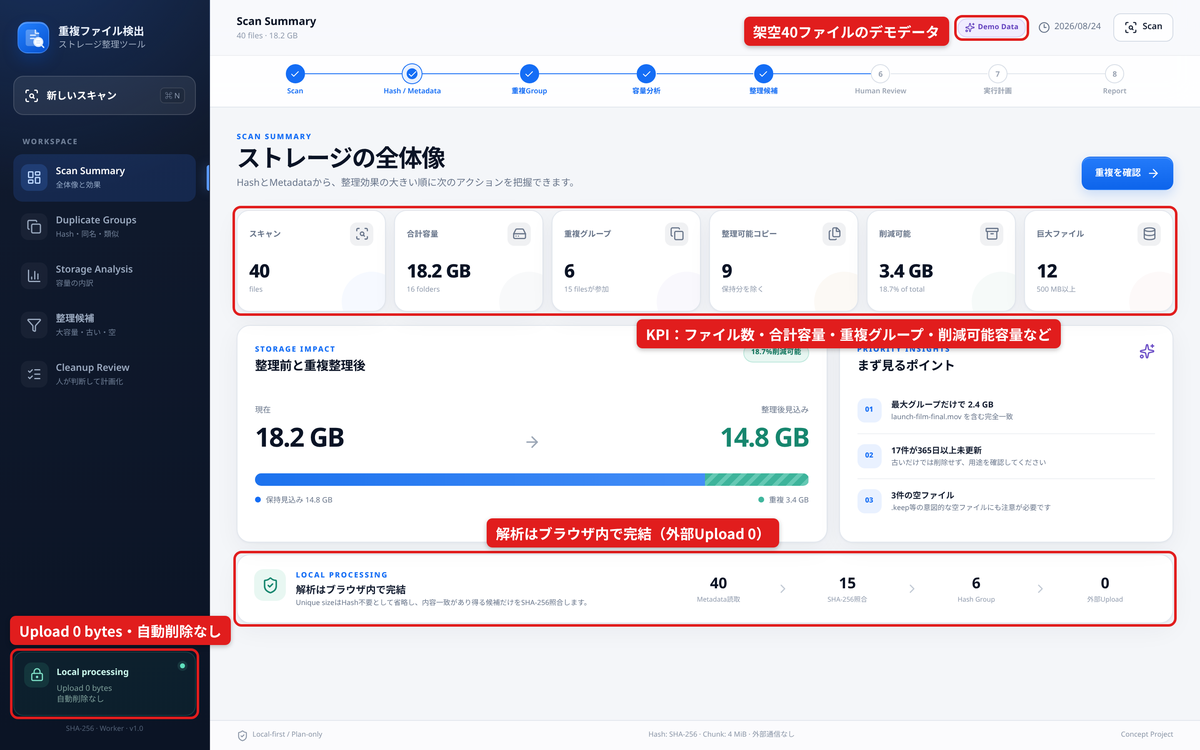
I will introduce the apps we are publishing on Tsukutta one by one. The 7th one is a web tool called "Duplicate File Detection and Storage Organization Tool" that finds duplicate and unnecessary files from the large volume of files accumulated on your computer and helps you create a plan for organizing them. IMG1 Why I made it The shared folder and computer storage capacity are getting full...
Try the app
重複ファイル検出・ストレージ整理ツール
Enjoyed this article?
Support Shunsuke Kinjo
I'm introducing apps published on Tsukutta one by one. The 7th is a web tool called "Duplicate File Detection & Storage Organization Tool" that finds duplicate and unnecessary files from the large volume of files accumulated on your computer and creates a plan for organizing them.
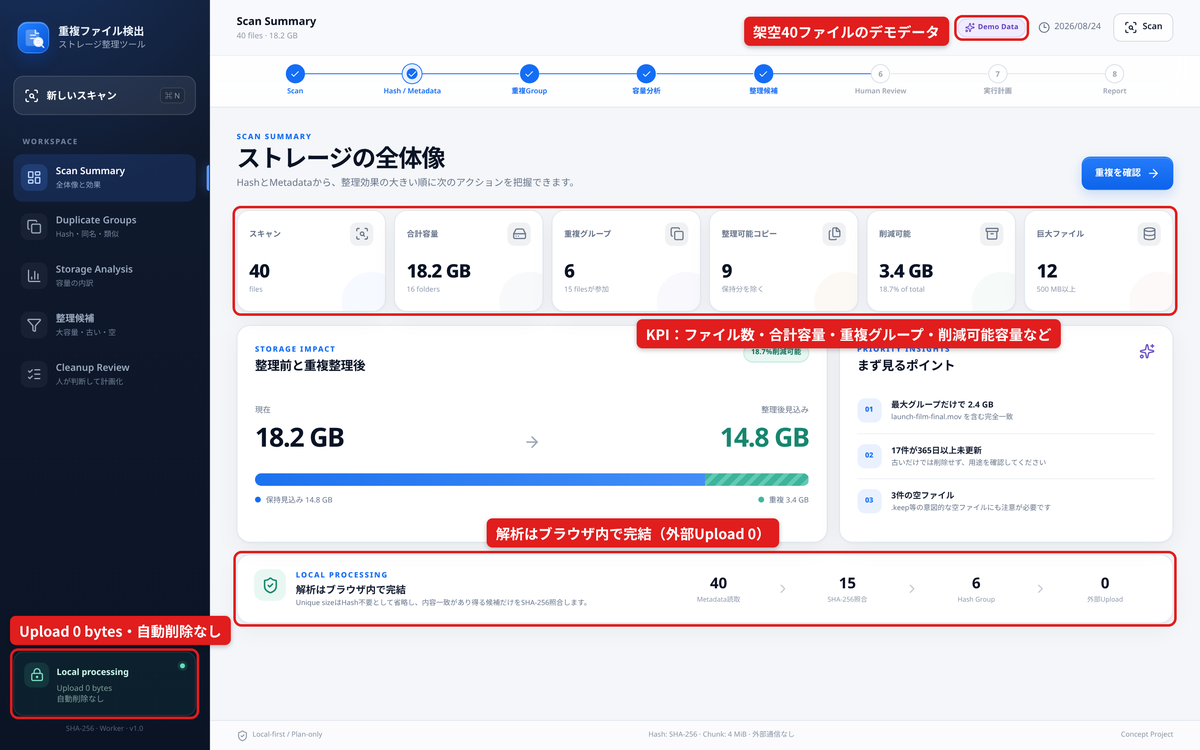
Even when shared folders or computer storage becomes full, it's difficult to decide what to delete. You can't tell from the filename alone whether files labeled with "Copy" or "final" actually have the same contents. On the other hand, there's anxiety that automatic deletion tools might remove necessary files as well.
So I created this with the policy of judging duplicates based on file contents rather than filenames, letting people decide which files to keep, and having the app itself never delete any files.
The features are arranged following the flow of reading, detection, analysis, judgment, and output.
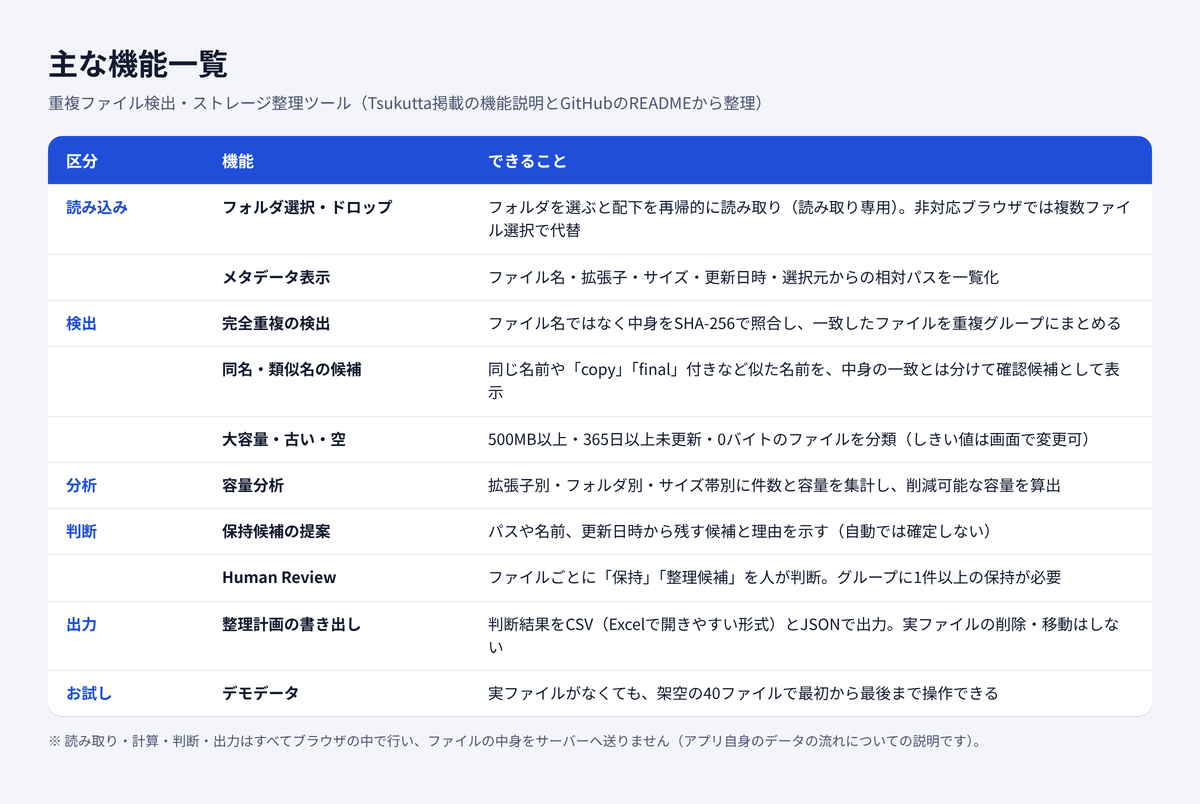
Duplicates are determined solely by whether SHA-256 hash values calculated from file contents match. Files with the same or similar names are displayed separately as "confirmation candidates" and are not mixed with content matches.
When you select or drop a folder, files within it are read in read-only mode. If you want to try without using actual files, press "Try with Demo Data" to operate through a demo dataset of 40 fictional files from start to finish.
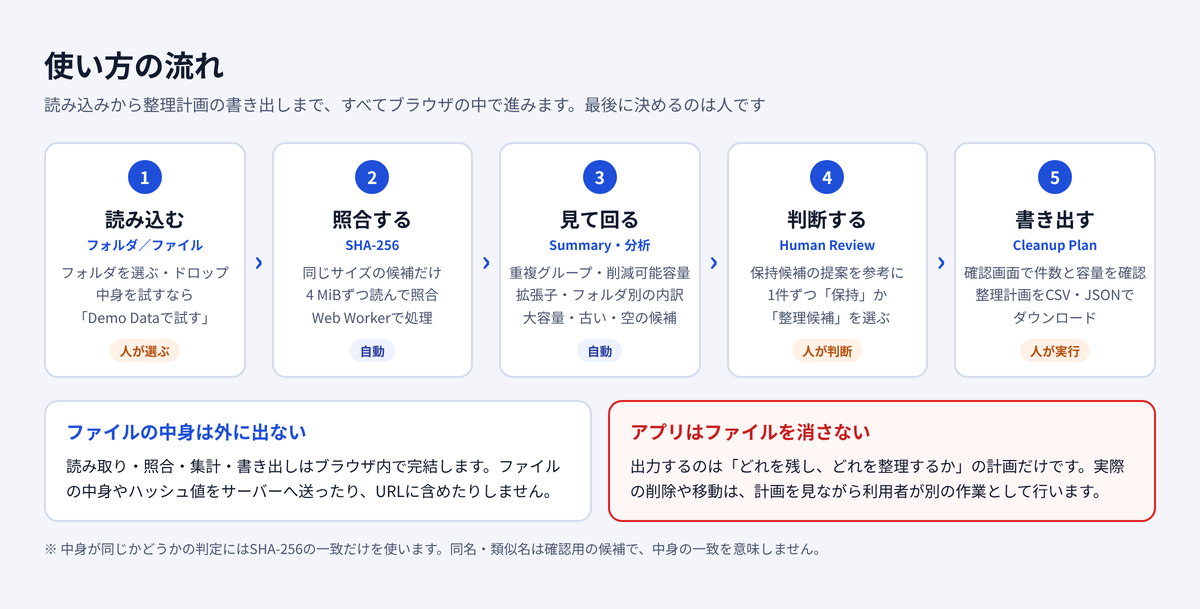
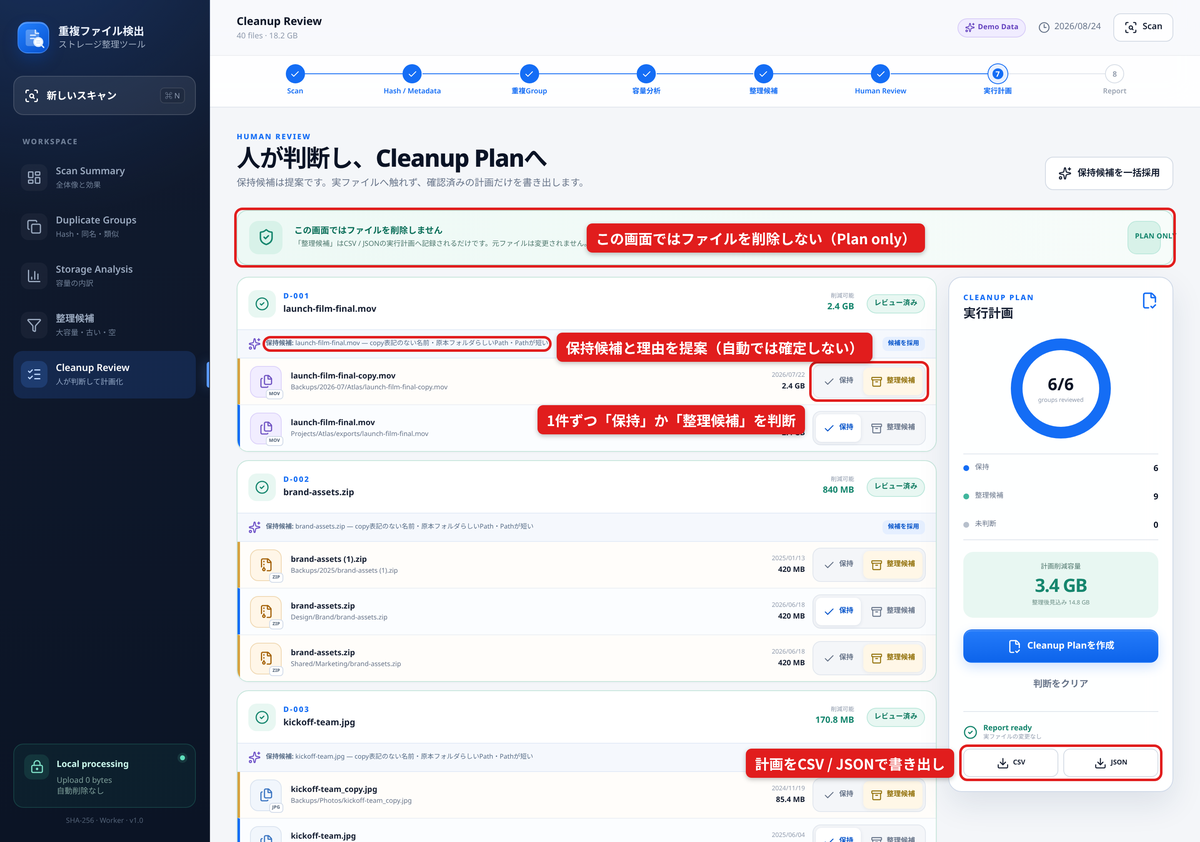
After confirming duplicate groups and reducible storage capacity on the overview screen, you proceed to judgment on the Cleanup Review screen. The app proposes candidates to keep and reasons based on path depth, names like "copy," and update dates, but doesn't automatically confirm. You select either "Keep" or "Organize candidate" for each item, proceed through a confirmation screen, and export the organization plan as CSV and JSON.
Development proceeded using AI-driven development, where AI coding agents like Codex and Claude Code write the code. The tech stack is Next.js 16 (App Router), React 19, TypeScript 5, with testing using Vitest and Testing Library, and it's published on Vercel as a statically exported site.
The most important thing was ensuring file contents never leave the browser. Reading, comparison, aggregation, and output all happen within the browser, and no server-side APIs or databases are used.
Since Next.js 16 has changed from how AI learned it, I placed a rule file for AI agents in the repository and have the AI read the included documentation before implementation. I verify through tests that hash calculations produce the same results regardless of how they're split, and that files with the same name but different contents aren't treated as duplicates. ESLint, type checking, tests, and production builds can all be verified together with a single command (npm run verify).
We also welcome inquiries about creating similar business applications.
Our portfolio is here: https://kj-web-app-portfolio.web.app/
Tsukuttaで公開しているアプリを、1本ずつ紹介していきます。7本目は、パソコンにたまった大量のファイルから重複や不要そうなファイルを見つけ、整理の計画を作るWebツール「重複ファイル検出・ストレージ整理ツール」です。
共有フォルダやパソコンの容量がいっぱいになってきても、何を消してよいかはなかなか判断できません。「コピー」や「final」が付いたファイルが本当に同じ中身なのか、名前だけでは分からないからです。一方で、自動で削除するツールは、必要なファイルまで消してしまう不安があります。
そこで、ファイル名ではなく中身で重複を判定し、どれを残すかは人が決め、アプリ自身は一切ファイルを消さない、という方針で作りました。
機能は、読み込み・検出・分析・判断・出力の流れに沿って並んでいます。
重複かどうかは、ファイルの中身から計算するSHA-256というハッシュ値が一致するかだけで判定します。名前が同じ・似ているファイルは「確認候補」として別に表示し、中身の一致とは混ぜません。
フォルダを選ぶかドロップすると、配下のファイルを読み取り専用で読み込みます。実際のファイルを使わずに試したい場合は「Demo Dataで試す」を押すと、架空の40ファイルのデモデータで最初から最後まで操作できます。
全体を見る画面で重複グループや削減できる容量を確認したら、Cleanup Reviewの画面で判断に進みます。アプリは、パスの深さや「copy」などの名前、更新日時から残す候補と理由を提案しますが、自動では確定しません。1件ずつ「保持」か「整理候補」を選び、確認画面を経て整理計画をCSVとJSONで書き出します。
開発は、CodexやClaude CodeなどのAIコーディングエージェントにコードを書かせるAI駆動開発で進めています。技術スタックは Next.js 16(App Router)、React 19、TypeScript 5、テストは Vitest と Testing Library で、静的書き出ししたものを Vercel で公開しています。
いちばん大切にしたのは、ファイルの中身を外に出さないことです。読み取り・照合・集計・書き出しはすべてブラウザの中で行い、サーバー側のAPIやデータベースは使っていません。
Next.js 16はAIが学習した頃の書き方と変わっている部分があるため、リポジトリにAIエージェント向けのルールファイルを置き、実装の前に同梱のドキュメントを読ませています。ハッシュ計算が分割の仕方に関係なく同じ結果になることや、名前が同じでも中身が違うファイルを重複にしないことはテストで確かめ、ESLint・型チェック・テスト・本番ビルドを1つのコマンド(npm run verify)でまとめて確認できるようにしました。
同じような業務アプリの制作もご相談ください。
制作実績はこちら:https://kj-web-app-portfolio.web.app/

