Show original
Enjoyed this article?
Support CY SILVEM
Share
AI translation
Enable generation of images, audio, and video from APIs. API keys are self-issued and OpenAI-compatible. Response speed is returned in all responses, so you can feel the speed with numbers.
Enjoyed this article?
Support CY SILVEM
We've made the image, audio, and video generation features that were previously only available within the app available as publicly callable APIs. There are three endpoints.
・POST /api/v1/images/generations — Image generation (synchronous, approximately 4 seconds at 1024² / 20 steps)
・POST /api/v1/audio/generations — Audio synthesis (synchronous, approximately 85–120ms to first audio)
・POST /api/v1/videos/generations — Video generation (asynchronous job, approximately 60–90 seconds)
Authentication uses a single Bearer token. The request format is aligned with OpenAI compatibility, making it easy to migrate from existing clients.
Usage examples:
`curl -X POST https://kotonia.ai/api/v1/audio/generations `
`-H "Authorization: Bearer kotonia_xxxxxxxx" `
`-H "Content-Type: application/json" `
-d '{ "input": "Hello!", "engine": "qwen3", "language": "en" }'
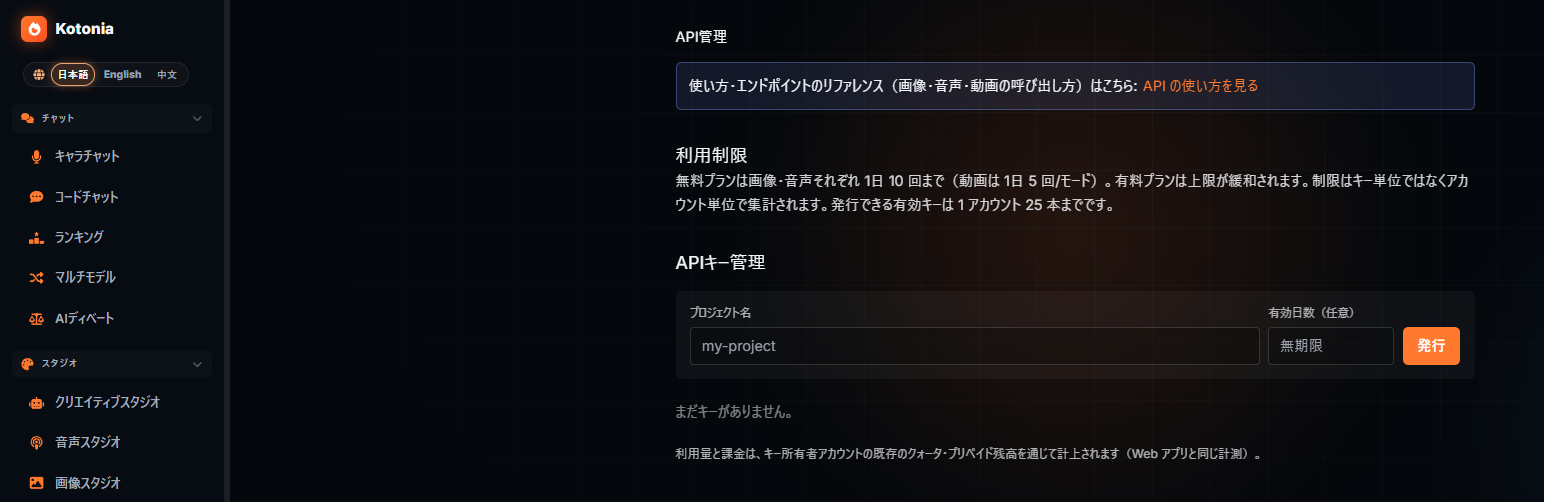
API keys are now self-issued. No inquiries or reviews required—just enter a project name on the "API Management" page and generate one. The plaintext key is displayed only once immediately after issuance (only the hash is saved), and if leaked, it can be revoked and reissued.
All responses include response speed (measured in milliseconds). Instead of saying "fast" in words, we include actual measured values in every response. You can verify the speed with your own eyes.
The free tier allows 10 requests per day each for images and audio (video has a separate quota). Billing is applied directly to your existing app balance and quota, so you don't need to create a separate account for API use.
Issuance and usage limits: https://kotonia.ai/api-manager
Usage guide and reference: https://kotonia.ai/use/api-manager
Next, we plan to release `kotonia-cli`. It's a CLI tool for interactive generation from the terminal, similar to Claude Code.
Building on this API, we plan to enable image, audio, and video generation from a single command. We aim to minimize the steps from "issuing a key → installing kotonia-cli → generating" so you can start using it without manually composing curl commands.
■ Visit the main site here
これまでアプリの中からしか使えなかった画像・音声・動画の生成機能を、外部から呼べるAPIとして公開しました。エンドポイントは3本です。
・POST /api/v1/images/generations — 画像生成(同期、1024² / 20stepsで約4秒)
・POST /api/v1/audio/generations — 音声合成(同期、最初の音声まで約85〜120ms)
・POST /api/v1/videos/generations — 動画生成(非同期ジョブ、約60〜90秒)
認証はBearerトークン1本。リクエストの形はOpenAI互換に寄せたので、既存のクライアントから移しやすいです。
使用例:
`curl -X POST https://kotonia.ai/api/v1/audio/generations `
`-H "Authorization: Bearer kotonia_xxxxxxxx" `
`-H "Content-Type: application/json" `
-d '{ "input": "Hello!", "engine": "qwen3", "language": "en" }'
APIキーがセルフ発行になりました。問い合わせも審査も不要で、「API管理」ページにプロジェクト名を入れて発行するだけ。平文キーは発行直後の1回だけ表示され(保存はハッシュのみ)、漏れたら失効して再発行できます。
全レスポンスに応答速度(実測ミリ秒)が入ります。「速い」と言葉で書く代わりに、毎回の応答に実測値を載せました。速さは自分の目で確かめてもらえます。
無料枠は画像・音声それぞれ1日10回(動画は別クォータ)。課金はアプリ側の既存の残高・クォータにそのまま乗るので、API用に別アカウントを作る必要はありません。
発行・利用制限: https://kotonia.ai/api-manager
使い方・リファレンス: https://kotonia.ai/use/api-manager
次は **`kotonia-cli`** をリリース予定です。Claude Code のように、ターミナルから対話で生成を回せる CLI ツールです。
今回のAPIを土台にして、画像・音声・動画の生成をコマンド1つから叩けるようにする予定。「キーを発行 → kotonia-cliを入れる → そのまま生成」までを最短にして、curlを手で組まなくても使い始められる状態を目指します。
■本サイトはこちらより
