Show original
Try the app

napps エンタメありの永久無料ツール集
Enjoyed this article?
Support ntones (エヌトーンズ)
Share
AI translation
写真Exif確認&削除ツールのご紹介
Try the app
napps エンタメありの永久無料ツール集
Enjoyed this article?
Support ntones (エヌトーンズ)
When You Need This
When you want to check if location information (GPS) is embedded in a photo before uploading it to SNS.
When you want to see a list of information embedded in a photo, such as shooting date/time and camera model.
When you need a copy with metadata removed before sharing client materials or documents.
With "Photo Exif Check & Delete," you can check, delete, and download everything right in your browser.
How to Use
\
こんなときに
SNSに写真を上げる前に、位置情報(GPS)が残っていないか確かめたいとき。
撮影日時やカメラ機種など、写真に埋まった情報を一覧で見たいとき。
クライアント資料や共有前に、メタデータを消したコピーがほしいとき。
「写真Exif確認&削除」なら、確認から削除・ダウンロードまでブラウザだけでできます。
使いかた
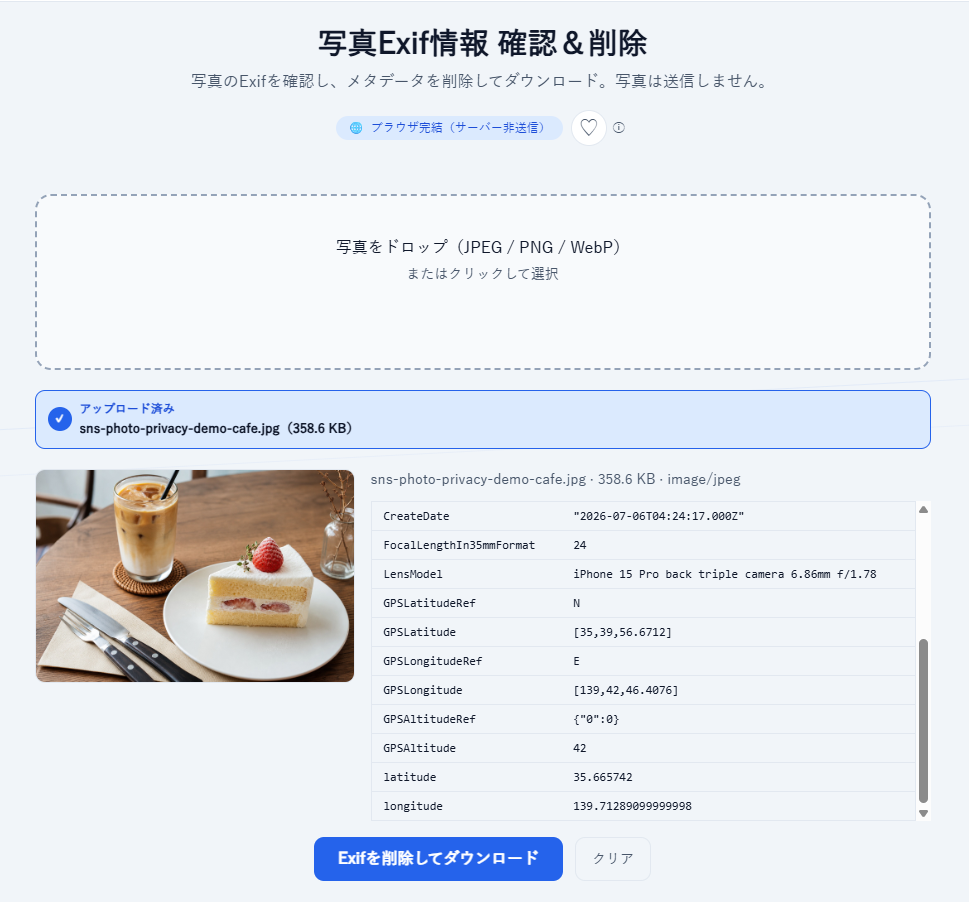
1.JPEG / PNG / WebP の写真をドロップ、またはクリックして選びます
2.プレビューとともに、Exif(撮影日時・カメラ・レンズ・ISO・GPSなど)が一覧表示されます。
3.題なければ「Exifを削除してダウンロード」で、メタデータなしの新しい画像を保存できます。
(iPhoneのHEICは、先に HEIC→JPEG 変換ツールでJPEGにしてから使ってください)
ポイント
・処理はブラウザ内で完結します。写真はサーバーに送信されません。
・顔ぼかしやモザイクが必要な場合は、別ツール「写真プライバシー加工」でできます。
・顔ぼかしやモザイクが必要な場合は、別ツール「写真プライバシー加工」と併用できます。
・ログイン不要で無料でお使いいただけます。今後、有料化することはありません。

