Show original
Try the app

napps エンタメありの永久無料ツール集
Enjoyed this article?
Support ntones (エヌトーンズ)
Share
AI translation
新たにQRコード安全性チェックを追加しました
Try the app
napps エンタメありの永久無料ツール集
Enjoyed this article?
Support ntones (エヌトーンズ)
Dangers of QR Code Scanning
When QR codes are scanned with a camera app or similar, links may open before you can check the contents, or screens for making phone calls, connecting to Wi-Fi, or adding contacts may appear.
Since replaced codes and fake sites designed to look authentic are common uses, it's safer to avoid "just scanning it anyway."
When This Happens
When you receive a QR code on a business card or flyer and want to check the contents before opening it.
When you want to verify the destination of a QR code from a parking lot, flyer, SNS, or other sources you're unsure about.
When you want to check, as a reference, whether a URL leads to a dangerous site.
Additionally, scanning QR codes from business smartphones especially requires prior verification.
With "QR Code Safety Check," you can read the contents from images or camera and perform a safety check.
How to Use
\
QRコード読み取りの危険性
QRコードは、カメラアプリなどで読み取ると、中身を確認する前にリンクが開いたり、電話発信・Wi-Fi接続・連絡先追加の画面が出たりすることがあります。
貼り替えられたコードや、見た目が本物に似せた偽サイトへの誘導にも使われやすいので、「とりあえず読み取る」は避けた方が安心です。
こんなときに
もらった名刺やチラシのQRを、開く前に中身だけ見たいとき。
駐車場・チラシ・SNSなど、心当たりの薄いQRの行き先を確かめたいとき。
URLなら危険サイトかどうかも、参考程度に確認したいとき。
その他、業務用スマートフォンからのQRコード読み取りは特に事前確認が必要です。
「QRコード安全性チェック」なら、画像やカメラから中身を読み取り、安全性チェックまでできます。
使いかた
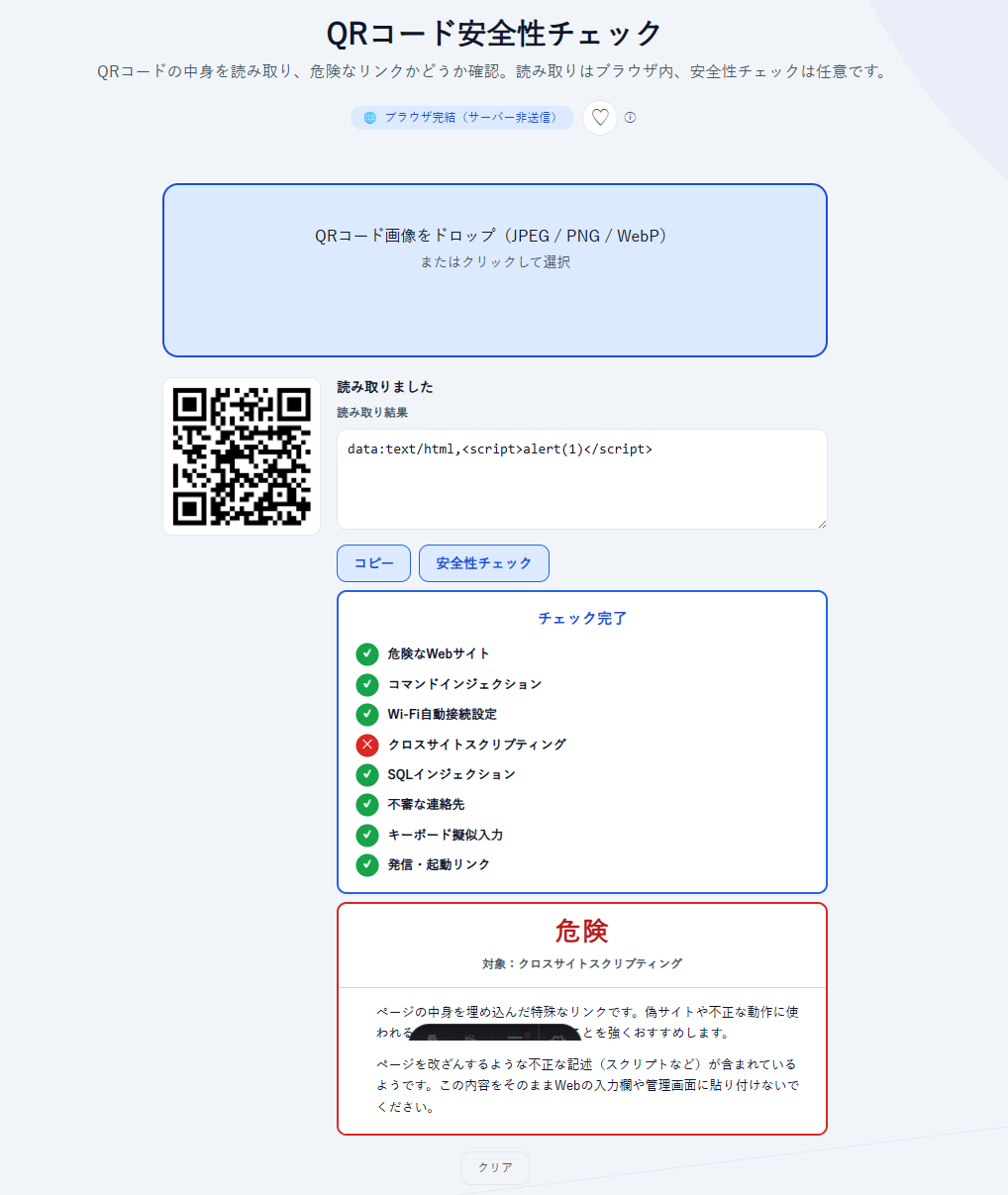
1.QRの画像をドロップするか、「カメラで読み取る」でかざします。
2.埋め込まれたURLやテキストが表示されます。
3.「安全性チェック」を押すと、危険なWebサイト・Wi-Fi自動接続・発信リンクなどの項目が順に確認され、最後に「安全」「注意」「危険」などの結果カードが出ます。
4.URLの場合は確認のあと、同意したときだけ外部のGoogle SafeBrowsingで照会します。
攻撃手法は常時更新され続けています。
結果は参考情報で、安全を保証するものではありません。
ポイント
・読み取り自体はブラウザ内で完結し、画像はサーバーに送りません。
・このツールは中身を表示するだけで、URLの自動オープンやWi-Fi・連絡先の自動実行はしないため事前に安全に確認できます。
・「安全性チェック」の結果は参考情報です。「安全」でも100%安心とは限りません。
これは、どれだけ優秀なツールを使っても同じことです。
・ログイン不要で無料でお使いいただけます。今後、有料化することはありません。

