Show original
Try the app

napps エンタメありの永久無料ツール集
Enjoyed this article?
Support ntones (エヌトーンズ)
Share
AI translation
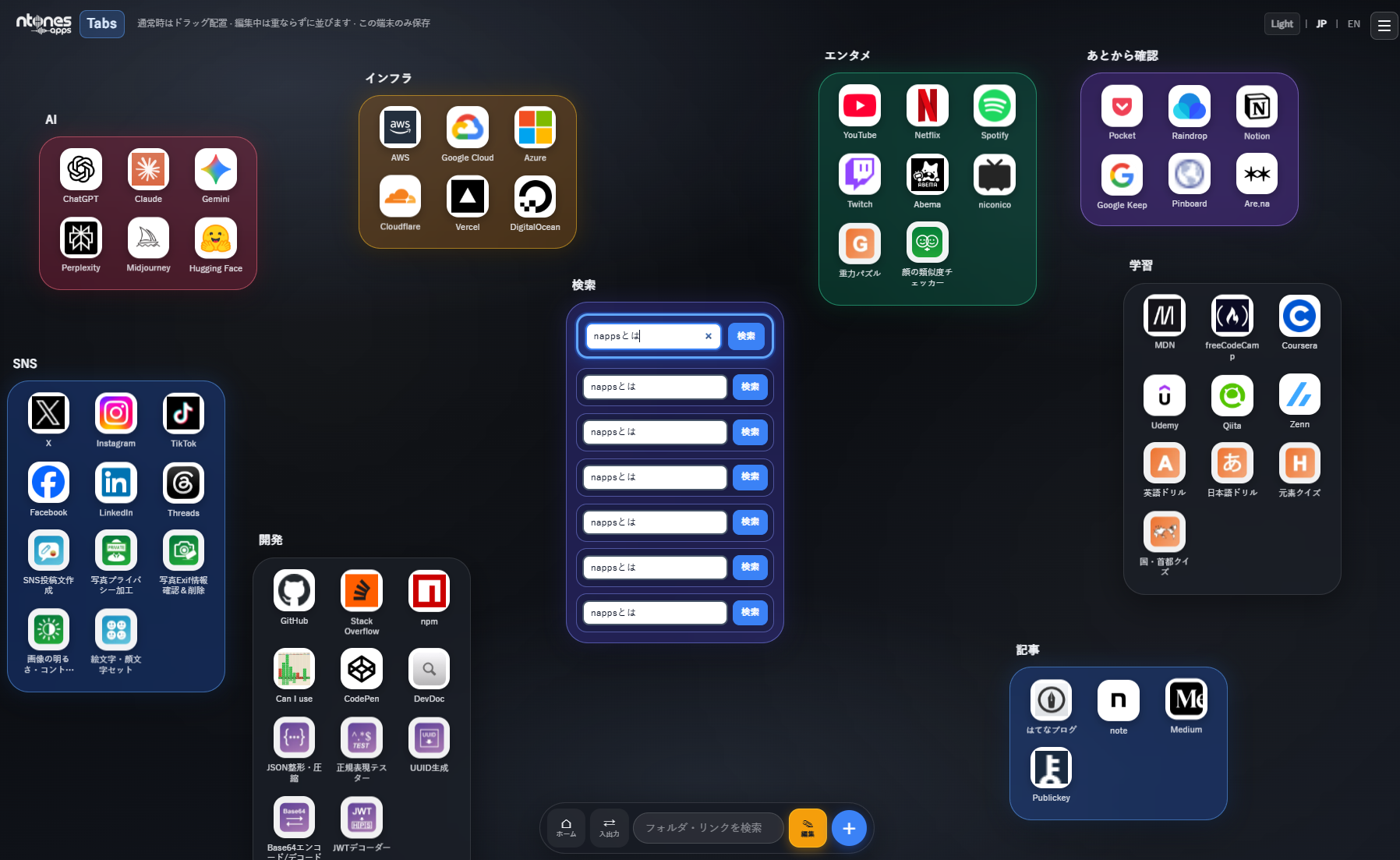
Tabs is a page where you can organize napps tools and external links in flexible groups. Data is stored only within the browser on this device, with no server synchronization. With this update, Tabs has evolved from a "link storage place" to something closer to a work desk that includes frequently used searches.
Try the app
napps エンタメありの永久無料ツール集
Enjoyed this article?
Support ntones (エヌトーンズ)
 ##
##
This Update's Contents
From item addition, you can insert the following search services.
・Standard Search: Google / Bing / DuckDuckGo / Yahoo! Japan / Yandex / Baidu
・AI Search: ChatGPT / Perplexity / Gemini (Google AI) / Microsoft Copilot / Grok
When added, a horizontal search bar will appear within the group.
Enter a search term and press Enter or click "Search" to open that service in a separate tab.
A dedicated box for opening multiple search boxes within a group with the same search term all at once.
Example: If you add Google, Perplexity, and ChatGPT, and enter "Tabs how to use" in simultaneous search,
each search result will open in separate tabs all at once.
Ideal for research, comparison, and fact-checking.
※On iOS (iPhone, iPad, etc.), attempting to open multiple tabs simultaneously may be blocked by the browser.
For this reason, simultaneous search cannot be added on iOS.
In edit mode, you can rearrange icons and search boxes using drag and drop.
It works like changing app positions on an iPhone home screen.
What became possible with this update
Open Tabs → Edit
1.グループの「+」からアイテム追加

2\. **検索サービス**で Google などを追加

3.必要なら **同時検索** も追加

4\. 編集を終了して、検索欄から使う
※ Simultaneous search is most effective when you add individual search boxes first.
In closing
To help reduce work effort even a little,
we will continue to update going forward,
so we appreciate your continued support of napps.
##
今回のアップデート内容
アイテム追加から、次のような検索サービスを入れられます。
・通常検索: Google / Bing / DuckDuckGo / Yahoo! Japan / Yandex / Baidu
・AI検索: ChatGPT / Perplexity / Gemini(Google AI) / Microsoft Copilot / Grok
追加すると、グループ内に横長の検索欄が表示されます。
検索語を入れてEnterまはた、「検索」を押すと、別タブでそのサービスが開きます。
グループ内の複数の検索枠を、同じ検索語でまとめて開く専用枠です。
例:Google・Perplexity・ChatGPT を入れておき、同時検索に「Tabs 使い方」などを
と入れると、それぞれの検索結果が別タブで一斉に開きます。
調べもの・比較・ファクトチェック向きです。
※iOS(iPhone, iPadなど)では、同時に複数タブを開こうとするとブラウザにより
ブロックされます。そのため、同時検索を追加できない仕様となっています。
編集モードでは、アイコンや検索枠を ドラッグ&ドロップ で並べ替えられます。
iPhoneのホーム画面でアプリ位置を変えるような感覚です。
アップデートでできるようになったこと
Tabsを開く → 編集
1.グループの「+」からアイテム追加

2\. **検索サービス**で Google などを追加

3.必要なら **同時検索** も追加

4\. 編集を終了して、検索欄から使う
※ 同時検索は、先に個別の検索枠を追加してから使うと効果的です。
最後に
少しでも作業の手間を省けるように
今後も更新を続けて参りますので
napps をよろしくお願いいたします。

