Show original
Enjoyed this article?
Support ntones (エヌトーンズ)
Share
AI translation
ご利用者様の要望により画像マーキングを作ったときのお話です
Enjoyed this article?
Support ntones (エヌトーンズ)
Background
A regular user of our service made a request:
"Could you create a tool that allows adding text and red boxes to images?"
To be honest, that request alone left too many unclear points, and I couldn't understand the details at all.
Since asking general users for detailed specification confirmations multiple times creates a heavy burden and is a high hurdle, I did something I would never do in professional work: "proceeded while imagining the details."
At the same time, I wanted to take this as an opportunity to practice "reading the purpose from minimal requirements."
I hadn't imagined the actual use case
napps is designed with business use in mind.
It was built with emphasis on local processing without servers or API communication, fast access through static generation, and complete immunity to attacks.
In business contexts, work on smartphones is almost non-existent; PCs are the standard.
When I informed the user that the tool was ready,
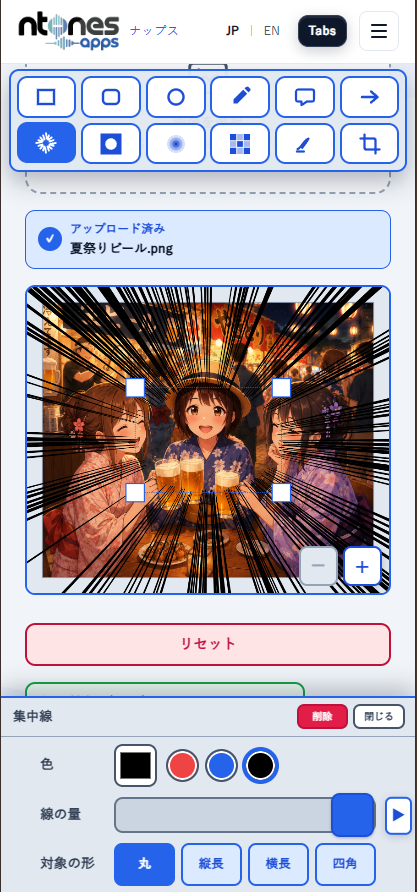
they replied "Done!" and sent me a portrait-oriented image.
I was taken aback 💦
The user wanted to add annotations to a screenshot they had taken on their smartphone while out and about, and upload it to social media.
Without asking for all the details, I should have at least asked about "the use case."
I regretted that the perspective of "SNS users often post via smartphone apps" had completely slipped my mind.
Actions taken afterward
napps can be used on smartphones,
but I hadn't considered the level of usability that native apps provide.
Since we're not monetizing it, I was unsure how far to go with improvements.
Currently, smartphone access accounts for about 20% of total traffic.
While originally designed for PC use,
I optimistically thought that improving the smartphone UI could increase page views even in the early stages at three months after launch,
so I decided to undertake a redesign of the smartphone UI.
Image marking has more features compared to other tools,
and even with AI-powered implementation, it took about 6 hours to get it into shape.
I'm releasing it as a beta version,
so please feel free to try it out if you'd like.
Thank you to everyone who has read this far.
経緯
日頃、お使いいただいているご利用者様から
「画像に文字や赤枠を追加できるツールを作成してほしい」
とのご要望がありました。
正直なところ、それだけの要望では不明点が多すぎて詳細が全くわかりませんでした。
一般の方に細かい仕様確認を何度もするのは、利用者の負担も大きくハードルが高いため仕事では絶対やらない「想像しながら進める」ことをしました。
あわせて「少ない要件から目的を読み取る練習」として挑戦してみよう
という思いもありました。
利用する場面を想像できていなかった
nappsは、ビジネス利用を想定した設計になっています。
サーバーやAPI送受信なし、ローカル処理、静的化による高速アクセスと
一切の攻撃を受け付けないというところに重視して作られています。
ビジネスでは、スマホで作業するということはほぼ無く、PCを使うのが一般的です。
ツールを作成して利用者に連絡したところ
「できました!」と縦長の画像が送られてきました。
思わず焦りました💦
利用者は、出先でスマホを使ってスクショした画像に注釈を入れ、SNSにアップしたかったのです。
利用者に詳細までは聞かずとも
せめて「利用する場面」ぐらいは聞いてもよかったのではないかと後悔しました。
「SNSユーザーはスマホアプリで投稿することが多い」という視点がすっぽり抜け落ちていたのです。
その後の対応
nappsは、スマホでも使えますが
ネイティブアプリほどの使いやすさまでは考慮していませんでした。
収益化しているわけでもないため、どこまで対応すべきか悩みました。
現在、スマホからのアクセスは全体の2割程度です。
元々はPC利用を想定していましたが、
スマホUIを改善すれば、公開3ヶ月目の初期段階でもPV数を伸ばせるのではないか
と楽観的に捉え、スマホ向けUIの再設計に踏み切ることにしました。
画像マーキングは、他のツールと比べて機能も多く
AIを活用した実装でも6時間ほどかかりましたが、なんとか形になりました。
β版として公開していますので、
もしよければぜひ触ってみてください。
ここまで読んでくださった方、ありがとうございます。
