Show original
Enjoyed this article?
Support Light One
Share
AI translation
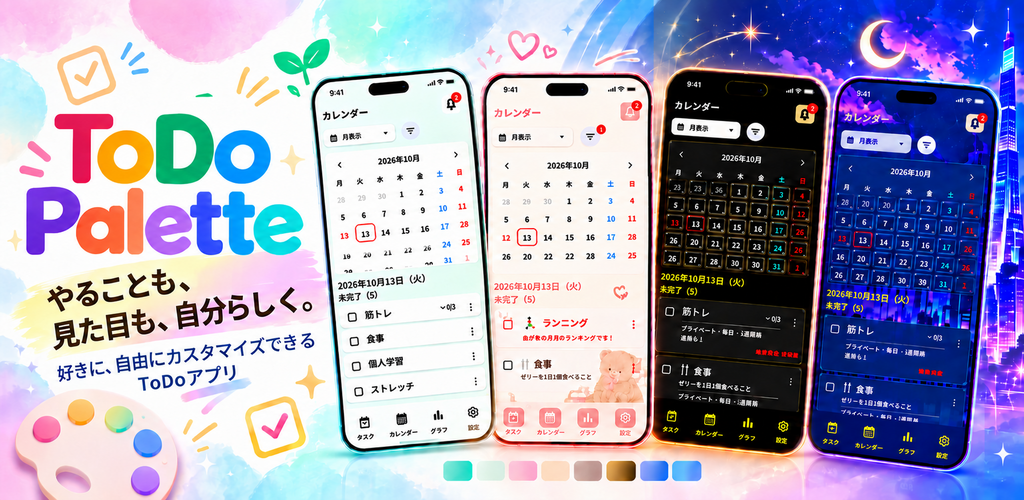
Born from the desire to "customize things more to my liking" after using several To-Do apps, ToDo Palette is an app that allows you to change the look and feel of everything from backgrounds to text to widgets. Here we introduce the thoughts behind this app.
Enjoyed this article?
Support Light One
Before starting work, when beginning to study, before heading out shopping. To-Do lists are opened in various situations throughout our daily lives.
What if we could make that screen we use every day look the way we want? If our favorite colors and backgrounds came into view when checking today's tasks, we thought we could enjoy task management in a way that suits us and keep it up more consistently.
Some people prefer simple screens, others like cute atmospheres, and some prefer cool designs. Creating a To-Do list where each person thinks "I want to use this screen" was the starting point for ToDo Palette.
I had used several To-Do apps in the past, but couldn't customize the parts I wanted to change, and felt "I wish I could use it with a look more suited to my taste."
So I decided to create a To-Do app myself that prioritizes customization. That's what prompted me to start making ToDo Palette.
Choose a background, change the text atmosphere, adjust the design of checkboxes and cards. The combination you've chosen becomes your everyday to-do list. We value that kind of "fun of creating your own app."
We aim for an app where you can choose both the look and how to use it depending on the situation and your preferences—a clean screen for work and studying, a favorite design for daily habits.
First, we prioritized making it easy to get started. We made it possible to change the appearance just by selecting a template, and structured it so you can fine-tune the background, font, color, and parts from there.
You can also adjust text color, size, and panel transparency to match the background atmosphere. Being able to refine both your favorite design and readability for yourself is another point we focused on.
The home screen widget can also be changed to your preference. Since it's a place that catches your eye before opening the app, we wanted to make sure you could use it with a look you love all the way to your home screen.
In Ver1.0.2, we added a calendar widget that supports month, week, and 3-day views. We also added 8 colors to the widget background that match the app. We made it possible to combine background design with either a background theme, background color, or background illustration, and improved the background image quality when enlarged.
Your tasks, your look, your way.
First, try registering one thing you want to do today and selecting your favorite template. We'd be happy if you could gradually develop it into a To-Do list that works best for you.
仕事を始める前、勉強に取りかかるとき、買い物に出かける前。ToDoリストは、日々のいろいろな場面で開くものです。
そんな毎日使う画面を、自分の好きな見た目にできたら。今日のやることを確認するときに、好きな色や背景が目に入ったら。タスク管理を、自分に合った形で楽しめる・継続できるのではないかと考えました。
シンプルな画面が好きな人も、かわいい雰囲気が好きな人も、格好いいデザインが好きな人もいる。それぞれが「自分はこの画面で使いたい」と思えるToDoリストを作ることが、ToDo Paletteの出発点です。
これまでToDoアプリをいくつか使ってきましたが、自分が変えたい部分までカスタマイズできず、「もっと自分好みの見た目で使えたら」と感じていました。
それなら、カスタマイズ性を重視したToDoアプリを自分で作ってみよう。そう考えたことが、ToDo Paletteを作り始めたきっかけです。
背景を選んで、文字の雰囲気を変えて、チェックボックスやカードのデザインを整える。自分で選んだ組み合わせが、いつものやることリストになる。そうした「自分のアプリを作るような楽しさ」を大切にしています。
仕事や勉強はすっきりした画面で、毎日の習慣はお気に入りのデザインで。使う場面や好みに合わせて、見た目も使い方も選べるアプリを目指しています。
まず大切にしたのは、手軽に始められることです。テンプレートを選ぶだけでも見た目を変えられるようにし、そこから背景・フォント・カラー・パーツを細かく調整できる構成にしています。
背景の雰囲気に合わせて、文字色やサイズ、パネルの透明度も調整できます。好きなデザインと、自分にとっての読みやすさを一緒に整えられることも、こだわっている点です。
ホーム画面のウィジェットも、自分好みに変えられます。アプリを開く前に目に入る場所だからこそ、ホーム画面まで好きな見た目で使えるようにしたいと考えています。
Ver1.0.2では、月・週・3日表示に対応したカレンダーウィジェットを追加しました。ウィジェットの背景には、アプリと同じ8色のカラーも追加。背景デザインと、背景テーマ・背景カラー・背景イラストのいずれかを組み合わせられるようにし、拡大したときの背景画質も改善しました。
やることも、見た目も、自分らしく。
まずは今日やりたいことをひとつ登録して、好きなテンプレートを選んでみてください。そこから少しずつ、自分が使いやすいToDoリストに育ててもらえたらうれしいです。
