Show original
Enjoyed this article?
Support さかあが
Share

AI translation
I wanted to know if my homemade tools were being used, so I tried GA4 and Cloudflare Web Analytics. The problems were: the abundance of settings, the maze of consent banners, and not knowing how to make use of the numbers. Based on my unsuccessful experience, I'll consider whether analytics are necessary for personal development projects.
Enjoyed this article?
Support さかあが
Do I Need Analytics for My Homemade App? I've Tried GA4 and Cloudflare, and I'm Still Undecided
I hit a wall with GA4, Cookiebot is left hanging, and I can't figure out how to use Cloudflare. This is an article where I think things through without reaching a conclusion.
It's been a while since I published my homemade tool, but to be honest, I have no idea how much it's being used right now. Just publishing it doesn't tell me whether anyone has actually opened it or not. That's what made me think, "If I add analytics, I could find out," and that's where this started.
What I wanted to know wasn't so much the number of people or visits themselves, but rather things like "where are they coming from and where are they dropping off?" and "how much is each page being viewed?" However, the moment I thought about wanting to know that, another question came up: is adding analytics really the right answer, and do I even need numbers in the first place?
This article isn't meant to reach a conclusion—it's a record of my confusion along the way.
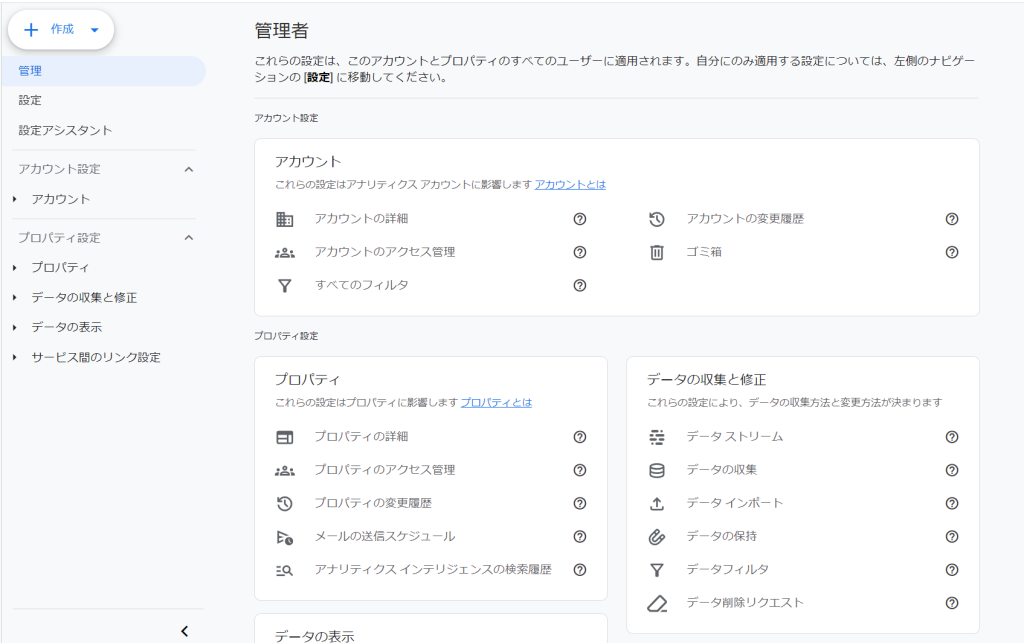 The first thing I tried was Google Analytics (GA4). It's the standard tool, and I had the feeling that "you can't go wrong with it." (Though I'm sure some people would disagree.)
But the moment I opened the admin panel, I got stuck. There were hierarchies like Account, Property, Data Stream... and I couldn't figure out where to set what. There were so many configuration options that even while researching, I couldn't decide "is this setting actually necessary for my tool?"
All I wanted to know was "which pages are being viewed," but there's too much to learn just for that. I was a bit thrown off by this gap.
I think being feature-rich is a strength. But when you just want to know how your personally-made tool is being used, do you really need all those features?
I thought that if I was going to add analytics, I should probably add a consent banner too, just to be safe. However, I don't own my own domain—I'm publishing using 〇〇.github.io a URL that comes with a public hosting service. So I chose Cookiebot as a consent banner tool that would work with that kind of URL.
At that time, I was using ChatGPT as my development consultant. I asked it how to set things up and sent screenshots, but I kept hitting the same error and couldn't move forward. In the end, I had to create a dedicated repository on GitHub just for this, have the code put in there, and then edit it myself—quite a roundabout way of doing things.
I managed to get the banner to display and thought "I'm almost done," but then the next wall came. Cookiebot treats browser storage areas like IndexedDB as part of the "Cookie" family and manages them. (I think, anyway...) My tool's own storage area showed up as "Uncategorized," and even when I asked for help dealing with that, I couldn't get it resolved properly.
I ended up giving up on it, and removing Cookiebot became too much of a hassle, so probably some half-finished version of it is still running. What was supposed to start as "just to be safe" ended up spending more time on the consent banner than on analytics itself, and it's still left hanging. I still can't decide whether it's worth all this effort to have it.
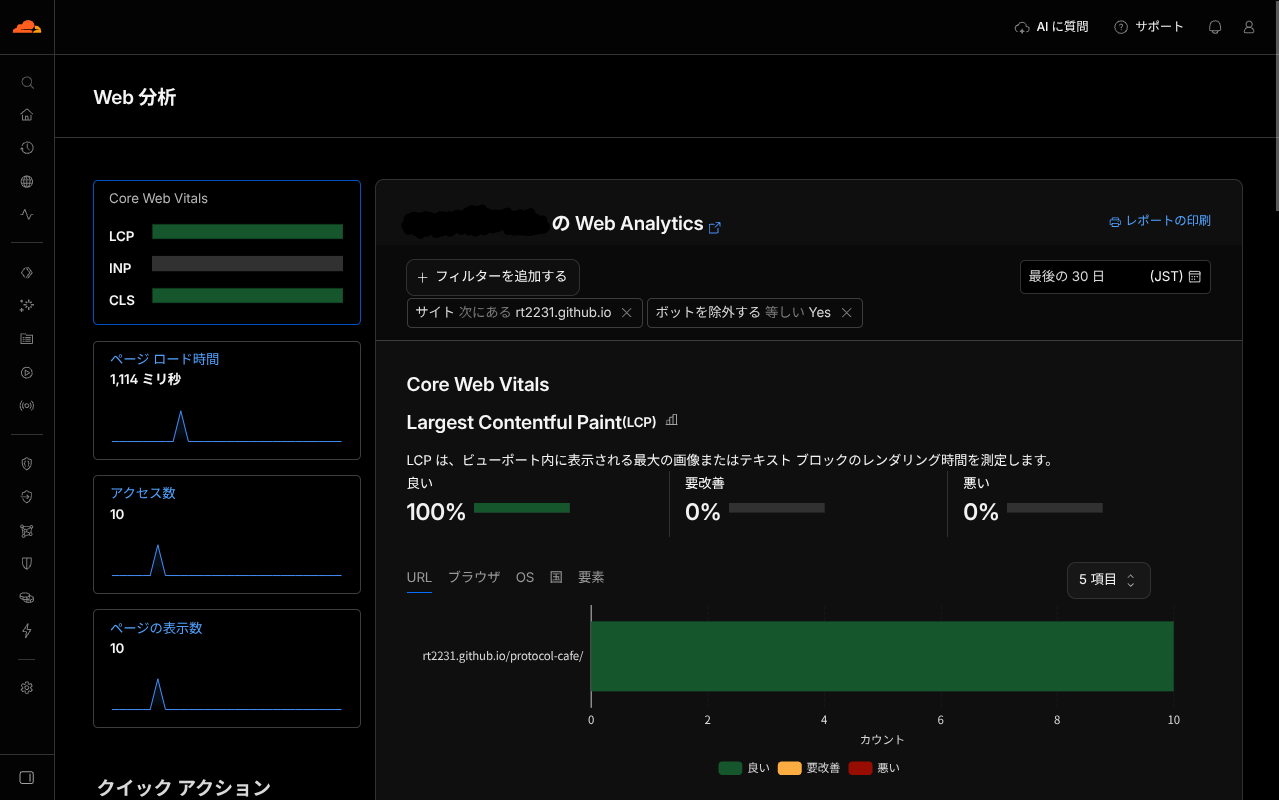 On the other hand, I also tried Cloudflare Web Analytics. This one was very easy to set up—I didn't have the kind of confusion I had with GA4.
When I opened the admin panel, the numbers were actually there. I could see visits and page views for each page—most of what I wanted to know was visible. Some items didn't show up, probably because I don't usually use Chrome, but basically it was working fine.
But then I ran into a different problem. I could see the numbers, but I didn't understand "what should I do with this information?" It's nice when visits go up, but I had no idea what to fix in my tool based on that. The same goes for promotion—I couldn't tell from the numbers which announcements were actually working.
That's when I realized that ease of implementation and actually being able to use something are two different things.
When I was thinking about adding analytics, I also considered "maybe I should look at the numbers separately for each tool." I thought if I could see which tool was being viewed more, it would be easier to prioritize improvements and promotion.
But when I actually tried thinking about it separately, it just meant more things to look at. More screens to check and more numbers to see, but that doesn't make the decision-making any easier. Plus, the view counts for each tool are still small, and there's not enough of a difference to really say "this one's popular" or "that one's not."
Maybe it would be better to lump all the site numbers together. But then I wouldn't know "which tool is being viewed" again. In the first place, when the numbers are still small, does it even make sense to break things down in detail?
As I've written so far, GA4 got stuck at setup, the consent banner is left hanging, and even though Cloudflare shows numbers, I can't see how to actually use them. In the end, I haven't reached an answer.
But for now, I've decided to "reinstall Cloudflare Web Analytics." It's easy to set up, and the numbers just keep accumulating without much effort on my part. Even if I don't know what to do with them now, maybe later I'll be able to look back and see "how things have changed since I published this."
I'm going to put off the conclusion for another time. The numbers might look different once they've accumulated, and I'll think about what to do about the consent banner then too.
How do you handle analytics for your homemade tools? Whether you use them or not, I'd like to hear what criteria you used to decide.
自作アプリに解析は必要? GA4もCloudflareも試して、まだ迷っています
GA4で挫折、Cookiebotは宙ぶらり、Cloudflareは見方が分からない。結論は出さずに考える記事です。
自作のツールを公開してしばらく経ちましたが、正直に言うと、今どれくらい使われているのかまったく分かっていません。公開しただけでは、誰かが開いてくれたのかどうかも見えないんですよね。「アクセス解析を入れたら分かるのでは」と思ったのが、出発点です。
知りたかったのは、人数や回数そのものより、「どこから来て、どこで離れているのか」「どのページがどのくらい見られているのか」といったことでした。ただ、それを知りたいと思った時点で、解析ツールを入れるのが正解なのか、そもそも数字が必要なのか、という問いも浮かびました。
この記事は結論を出すものではなく、迷っている途中の記録です。
まず試したのはGoogleアナリティクス(GA4)です。定番のツールですし、「入れておけば間違いない」という気持ちがありました。(そう思わない方もいるとは思いますが)
ところが、管理画面を開いた時点で手が止まりました。アカウント、プロパティ、データストリーム……と階層が
分かれていて、どこで何を設定すればいいのかがまず分かりません。設定項目も多く、調べながら進めても「これは自分のツールに必要な設定なのか」を判断できないままでした。
知りたいのは「どのページが見られているか」くらいなのに、そのために覚えることが多すぎる。この差に、少し戸惑いました。
多機能なのは強みなのだと思います。ただ、個人で作ったツールの利用状況を知りたいだけの場合、その多機能さは必要なのでしょうか。
解析を入れるなら、同意バナーも付けておいたほうが安心だろう、と考えました。ただ、私は独自ドメインを持っておらず、公開サービスについてくる〇〇.github.ioのようなURLで公開しています。そこで、そのURLでも使える同意バナーのツールとしてCookiebotを選びました。
当時の私は、開発の相談相手にChatGPTを使っていました。設置方法を聞いたり、画面の写真を送ったりしたのですが、同じエラーで止まり続けて先に進みません。結局、そのためだけにGitHubに専用のリポジトリを作り、そこにコードを入れてもらって自分で編集する、という回り道をすることになりました。
バナーは何とか表示できて「ほぼできた」と思ったところで、次の壁が来ました。Cookiebotは、IndexedDBのようなブラウザの保存領域もCookieの仲間として扱って管理します。(たしか、、)私のツールが独自に使っている保存領域が「未分類」と出てしまい、その対応を相談しても、うまく解決しませんでした。
そのまま断念して、Cookiebotを外すのも面倒になり、たぶん今も中途半端な状態のものが動いています。「念のため」で始めたはずが、解析そのものより同意バナーのほうに時間を使って、しかも宙ぶらりんのまま残っている。ここまでして付ける必要があるのか、いまも決めきれていません。
一方、Cloudflare Web Analyticsも入れてみました。こちらは導入がとても簡単で、GA4のときのような迷いはほとんどありませんでした。
管理画面を開くと、ちゃんと数字も出ていました。訪問数やページごとの表示回数など、知りたかったことの多くは見られました。普段使っているブラウザがChromeではないせいか、表示されない項目もありましたが、基本的にはうまく動いていました。
ただ、そこで別の問題にぶつかりました。数字は見られるのに、「これを見て、自分は何をすればいいのか」が分からなかったのです。訪問数が増えたら嬉しいですが、それでツールの何を直すのかは見当がつきませんでした。宣伝についても同じで、どこで告知したものが効いたのか、数字からは分かりませんでした。
導入のしやすさと、使いこなせるかどうかは別の話なのだと、ここで気づきました。
解析を入れるとき、「ツールごとに数字を分けて見たほうがいいのでは」とも考えました。どのツールがよく見られているのか分かれば、改善や宣伝の優先順位をつけやすそうに思えたからです。
ただ、実際に分けて考えてみると、見るものが増えるだけだと感じました。確認する画面も数字も増えますが、そのぶん判断が楽になるわけではありません。それに、それぞれのツールの閲覧数はまだ小さく、分けたところで「多い」「少ない」を言えるほどの差も出ません。
それなら、サイト全体の数字で一括りにしたほうがいいのかもしれません。ただ、そうすると「どのツールが見られているか」はまた分からなくなります。そもそも、数字が小さいうちは細かく分けること自体に意味があるのでしょうか。
ここまで書いてきたとおり、GA4は設定で止まり、同意バナーでは宙ぶらりんになり、Cloudflareは数字が出ても活用の見通しが立ちませんでした。結局、答えは出ていません。
ただ、今のところは「Cloudflare Web Analyticsをいったん入れ直しておく」ことにしました。導入が簡単で、手間をかけずに数字だけは溜まっていくからです。いま使い道が分からなくても、あとで「あのとき公開してから、どう変わったか」を振り返れるかもしれません。
結論は、また今度にしようと思います。数字が溜まったら見え方が変わるかもしれませんし、同意バナーをどうするかも含めて、そのとき改めて考えます。
みなさんは、自作ツールの解析をどうしていますか。入れていない人も、入れている人も、どんな基準で決めたのか聞いてみたいです。
