Show original
Try the app

Raisu NewTab — Customizable New Tab Page
Enjoyed this article?
Support Raisu
Share
AI translation
なぜ作ったのか、既存のものとどう違うのか、安全性、今後について
Try the app
Raisu NewTab — Customizable New Tab Page
Enjoyed this article?
Support Raisu
Some of you may know me from DayTheme.
Hello, I'm Raisu.
I create not only DayTheme but also sites like this.
I would be delighted if you would try using them.
This time, I would like to talk about Raisu NewTab, which I have been developing since around April. I would be happy if, through this discussion, you would use something I have created.
DayTheme is from こちら
Raisu NewTab is from こちら
Raisu Native is from こちら
As a premise, new tabs already exist in browsers by default.
So why did I make it? I would like to talk about that.
The big reason: existing ones have unnecessary features that increase on their own, while desired features don't increase.
That's it.
80% of my reason for making this is this.
I don't need AI in a new tab.
I want to access over 1000 search engines from a new tab.
Actually, I was developing something called Raisu Thousand as a predecessor, but I ended development of that midway.
As the name suggests, it was something that allowed access to 1000 search engines from a new tab.
Don't worry, that has been realized through Raisu NewTab.
In Raisu NewTab, based on feature addition requests received through support, we add only what users truly need.
Of course, even when there are no opinions, some additions are decided by my own discretion.
In this way, reduce unnecessary things and properly incorporate necessary ones.
I created it because I wanted such a new tab.
The big point is, of course, the ability to choose search engines.
Google, Bing, Amazon, Spotify, ChatGPT, GitHub, Apple Maps, Steam.
From general to specialized.
You can search from just one place.
1219 engines are currently available. (some duplicates included)
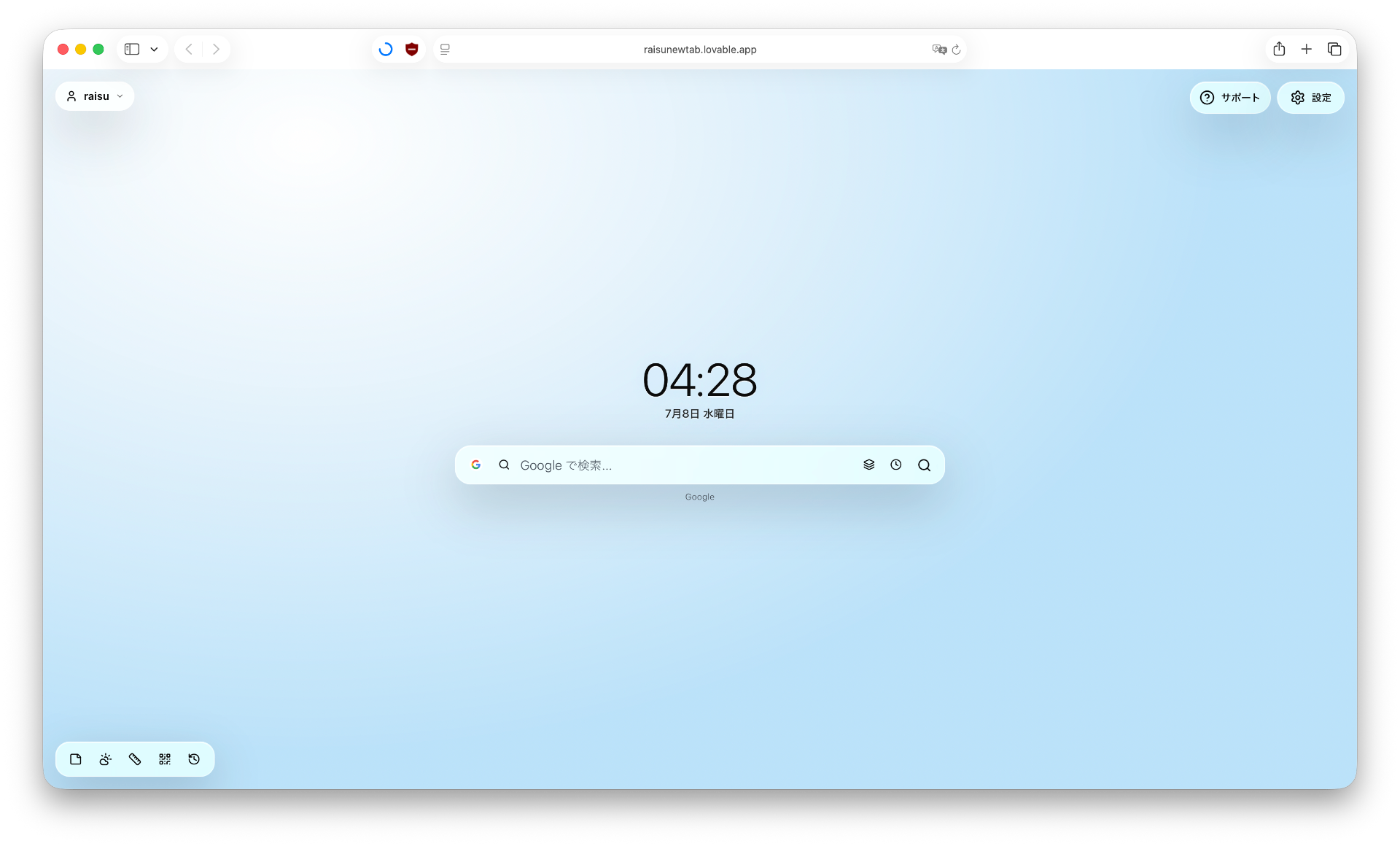
The characteristics of this site are search mode and link mode.
In search mode, you input and search as usual.
In link mode, you can access by putting a link in the search bar.
Of course, from http://」や「https://」は必要ありません。
You can change from the magnifying glass icon on the left or the link mark.
And above all, there's the app feature.
Calculator, notes, timer, unit conversion, search history, QR code, etc...
Of course, it's fully usable even without extensions.
The notes app is more convenient with extensions. (bold and font size changes in screenshots are extensions)
UI font size changes are also a feature.
You can make only some parts larger and some parts smaller.
Unlike existing ones where you can't change it, everything changes.
Say goodbye to such inconvenience.
Of course, you can change everything too.
Below, I have listed safety information for each category.
Account Information: Information necessary for authentication and extension activation status, etc. are saved on the server.*1
Search History: Local storage only.*2
Notes: Local storage only.*2
QR Code: No information is stored anywhere. (except for QR code downloads)
Weather: Current location information is sent to a site called Open Metro.
Various Settings: Stored locally.*2
*1 Detailed information is listed in the privacy policy on the site
*2 Locally stored data varies by browser. Backup functionality is available through extensions. Also, by contacting support, you may be able to use only the backup feature. (A reason such as device migration is required, even if brief)
This site delivers updates irregularly.
Update history and such can be viewed from support in the top right.
(All detailed explanations are in English)
Although irregular, updates are definitely delivered at least once a month.
Thank you for reading this far.
I would be delighted if you would use Raisu NewTab, Raisu Native, and DayTheme.
Raisu
Support: instagram/raisunewtab
Hub Site: Raisu Native (こちらから)
↑Recently evolved!!!!!↑
DayThemeで私のことを知ってくれた人もいると思います。
こんにちはRaisuです。
私はDayThemeだけでなくこのようなサイトも作っています。
ぜひ利用してみていただきたいです。
今回はRaisu NewTabという4月ごろから開発しているものについてお話ししようと思います。今回の話で少しでも私が制作したものを利用いただけるようであれば幸いです。
DayTheme は こちら から
Raisu NewTab は こちら から
Raisu Native は こちら から
大前提、新規タブなんてものはブラウザに元からあります。
なのになぜ作ったのか。そこについて語ろうと思います。
大きな理由。それは既存のものは無駄な機能が勝手に増えて、欲しいものは増えない。
これです。
私が作った理由の8割はこれです。
新規タブでAIなんていらない。
新規タブで1000を超える検索エンジンにアクセスしたい。
実は前身となるRaisu Thousandというものを開発していましたがそれは途中で開発を終了しました。
名前の通り1000もの検索エンジンに新規タブからアクセスできるというものです。
安心してください、それはRaisu NewTabによって実現されました。
Raisu NewTabではサポートに寄せられた機能追加要望などを基にユーザーの皆様が本当に必要としているもののみ追加していきます。
もちろん意見がない場合でも私の独断で追加が決定するものもあります。
といったように、無駄なものは削減し、必要なものはしっかり組み込む。
そんな新規タブが欲しいという理由で制作しました。
大きな点はもちろん検索エンジンの選択が可能な点です。
GoogleもBingもAmazonもSpotifyもChatGPTもGitHubもApple MapsもSteamも。
一般的なものから専門的なものまで。
たった1か所から検索が可能です。
1219個のエンジンが現在利用可能です。(一部重複あり)
当サイトの特徴は検索モードとリンクモードです。
検索モードでは普段通り入力して検索。
リンクモードではリンクを検索バーに入れるとアクセスすることができます。
もちろん「http://」や「https://」は必要ありません。
左側の虫眼鏡マーク、もしくはリンクマークから変更が可能です。
そしてなんといってもアプリ機能でしょう。
計算機、メモ、タイマー、単位変換、検索履歴、QRコードなど...
もちろん拡張機能なしでも十分利用可能です。
メモアプリのみ拡張機能があるとより便利です。(スクリーンショットの太字や文字サイズ変更は拡張機能です)
UIの文字サイズ変更なども特徴です。
一部だけ大きくして、一部は小さくしたい、が可能です。
既存のもののように変更できない、全て変更になる。
そんな不便さとはさよならです。
もちろん全て変更することもできます。
以下に項目ごとの安全性について記載しています。
アカウント情報: サーバー上に認証に必要な情報や拡張機能の有効化状態などを保存します。*1
検索履歴: ローカル保存のみです。*2
メモ: ローカル保存のみです。*2
QRコード: どこにも情報の保存はされません。(QRコードのダウンロード以外で)
天気: 現在地情報をOpen Metroというサイトに対し送信します。
各種設定項目: ローカル保存されます。*2
*1 詳細情報はサイト内のプライバシーポリシーに記載
*2 ローカル保存されたデータはブラウザごとに変わります。拡張機能でバックアップ機能が利用可能です。また、サポートに連絡することでバックアップ機能だけを使えるようになる場合があります。(端末の移行などの理由(短くても大丈夫です)を必要とします)
このサイトは不定期でアップデートを配信しています。
アップデート履歴などは右上のサポートから閲覧が可能です。
(全て英語での詳細説明です)
不定期ではあるものの月に1回は確実にアップデートが配信されます。
ここまで読んでいただきありがとうございました。
Raisu NewTabそしてRaisu Native, DayThemeをぜひ利用していただけると幸いです。
Raisu
サポート: instagram/raisunewtab
ハブサイト: Raisu Native (こちらから)
↑最近進化しました!!!!!↑

