Show original
Try the app

SUGUDASU 赤入れ
Enjoyed this article?
Support カオル
Share
AI translation
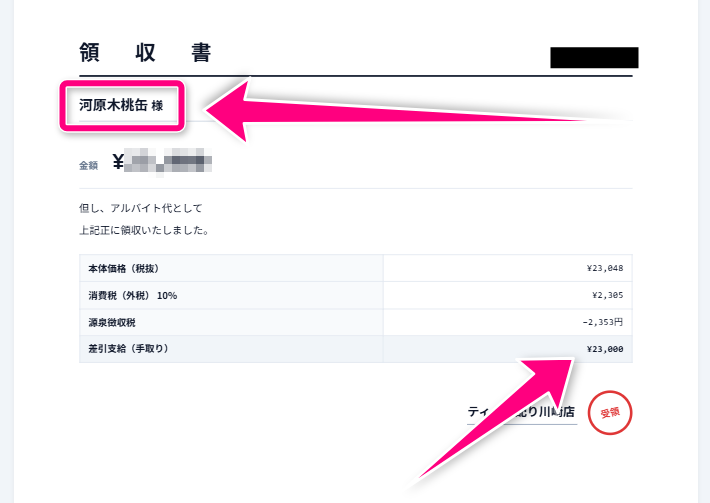
I didn't want to upload a screenshot of the handover manual to the processing site. I placed SUGUDASU red markup so that I could finish the work of blacking out and pointing with arrows within the browser.
Try the app
SUGUDASU 赤入れ
Enjoyed this article?
Support カオル
Many workplaces prohibit uploading screenshots to image editing sites when removing customer names from handover notes or incident reports. I was more concerned about the accident of "thinking I'd hidden it" by just overlaying a stamp while the text underneath remained visible. That's why I created SUGUDASU with the red markup feature.
Hiding means blackout, blur, or pixelation. Pointing means arrows, frames, or ovals. Hide first, then point. Stamps or frames alone won't make things disappear. Input images and PDFs are not sent to our company servers by design. There is no registration.
There is no automatic face detection or OCR. It's not a replacement for Acrobat. It's a tool for organizing one manual sheet we're releasing today within the device and taking it home.
Try: https://sugudasu.com/annotate?utm_source=tsukutta&utm_medium=social&utm_campaign=story_annotate_why約束: https://sugudasu.com/statements
引き継ぎや障害報告のスクショから顧客名を消すとき、画像加工サイトへ上げるのが社内で禁止、という現場は多いです。私は「隠したつもり」でスタンプだけ重ねて、下の文字が残っている事故の方が怖かった。SUGUDASU 赤入れを置いた理由は、そこです。
隠すのは黒塗り・ぼかし・モザイクです。指すのは矢印・枠・楕円です。先に消してから指す。スタンプや枠だけでは消えません。入力の画像やPDFは当社サーバーへ送らない設計です。登録はありません。
顔の自動検出や OCR はありません。Acrobat の代わりでもありません。今日出す1枚のマニュアルを、端末の中で整えて持ち帰るための道具です。
試す: https://sugudasu.com/annotate?utm_source=tsukutta&utm_medium=social&utm_campaign=story_annotate_why約束: https://sugudasu.com/statements

