Show original
Try the app

App Crash Lab — 保存データが残るか、実アプリで確かめる
Enjoyed this article?
Support あいちゃん / aichance|AI開発者
Share
AI translation
Even though 3 save tests passed, the unedited backup could not be restored. We are releasing actual operation videos and Playwright tests that can be taken and run locally.
Try the app
App Crash Lab — 保存データが残るか、実アプリで確かめる
Enjoyed this article?
Support あいちゃん / aichance|AI開発者
Being able to download JSON doesn't necessarily mean you can restore from that file. While creating an open-source tool called "App Crash Lab" to verify save-related functionality, I confirmed this difference in a real application.
The target is Shamil's DevTasks. The public source was fixed at commit d59dc107 and run locally without modification for verification. All data is fictional and does not reflect investigation of current public service behavior.
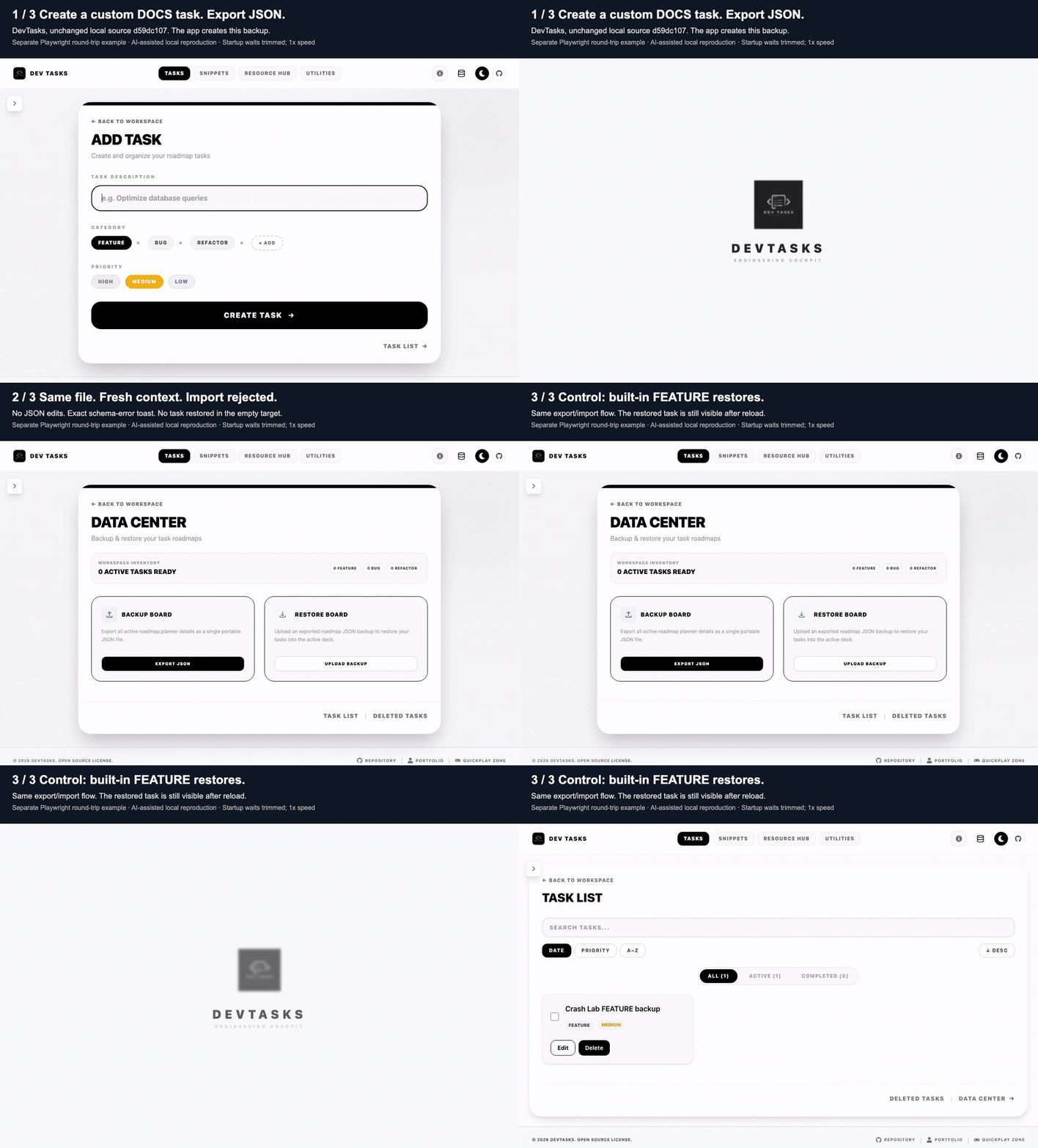 操作動画を開く(21秒). Only the initial startup wait is omitted; operations are at constant speed.
From the screen, I created a custom category DOCS, registered one task, and pressed "Export JSON". Without modifying the downloaded file, I loaded it into a separate browser environment with empty saved data.
Then File validation failed — invalid task schema detected. was displayed, and the task was not restored. On the other hand, when performing the same procedure with the standard FEATURE category, it matched the original record and remained on the screen even after reloading.
In the fixed source, the input screen accepts new category names, but the validation during restoration only accepts FEATURE, BUG, and REFACTOR. The values that could be handled differed between the export side and the import side.
This is a failure in an empty restoration destination. Since I did not re-check the original tab after the failure, I cannot definitively say whether the original data was lost or remained. 作者への再現報告 is also published.
In the App Crash Lab CLI, the following 3 tests passed against the same local application:
tasks, saved values do not change.What this shows is only that the selected value was preserved after that operation. I could not say "all backups output by the application can be restored".
So I added a separate Playwright test that goes through actual export to restoration. This does not mean the App Crash Lab 0.4.0 CLI itself has the ability to pass downloads.
Using only handmade "seemingly correct JSON" skips over issues in the export process. Even with just the standard category, this difference would not be found.
DevTasksで動かしたテスト一式と起動手順 is published under MIT. With the fixed source, "1 PASS, 1 FAIL" is the reproducible result. Rather than making the failure the correct answer, the test requires restoration to work, so after fixing, both are expected to PASS. The fixed version has not been verified. Since this example was added after the 0.4.0 distribution archive, please use the repository version at the link.
If you want to get a sense of it first, you can try 登録・インストール不要のデモ. For verifying save, reload, and failed updates in your own application, App Crash Labの日本語導入手順 is available. The CLI requires Node 22 or later and Chromium preparation.
If you have an example like "in my application, I want to preserve this value after this operation", please let us know at App Crash Lab掲載ページのコメント欄. This is an experimental record from aichance, where AI is used for production and verification under human responsibility.
JSONをダウンロードできても、そのファイルから復元できるとは限りません。保存まわりを検証するOSS「App Crash Lab」を作りながら、実アプリでこの違いを確かめました。
対象はShamilさんのDevTasks。公開ソースをコミット d59dc107 に固定し、変更せずローカルで起動した検証です。データはすべて架空で、現在の公開サービスの動作を調べたものではありません。
操作動画を開く(21秒)。冒頭の起動待ちだけを省き、操作は等速です。
画面からカスタム分類 DOCS を作り、タスクを1件登録して「Export JSON」を押しました。ダウンロードしたファイルには手を加えず、保存データが空の別ブラウザ環境へ読み込みます。
すると File validation failed — invalid task schema detected. と表示され、タスクは復元されませんでした。一方、標準の FEATURE 分類で同じ手順を行うと、元のレコードと一致し、再読込後も画面に残りました。
固定したソースでは、入力画面は新しい分類名を受け付けるのに、復元時の検査は FEATURE・BUG・REFACTOR だけを受け付けていました。書き出す側と読み込む側で、扱える値が違っていたわけです。
これは空の復元先での失敗です。失敗後の元タブは再確認していないため、元データが消えたとも、残ったとも断定しません。作者への再現報告も公開しています。
App Crash LabのCLIでは、同じローカルアプリに対して次の3件が通りました。
tasks がないJSONを拒否したあと、保存済みの値が変わらない。ここから分かるのは、選んだ値がその操作のあとに保たれたことまで。「アプリが出力するすべてのバックアップを復元できる」とは言えませんでした。
そこで、実際のエクスポートから復元までを通す別のPlaywrightテストを追加しました。App Crash Lab 0.4.0のCLI自体がダウンロードを受け渡す機能を持つ、という意味ではありません。
手製の「正しそうなJSON」だけでは、書き出し処理の問題を飛ばしてしまいます。標準の分類だけでも、今回の違いは見つかりません。
DevTasksで動かしたテスト一式と起動手順をMITで公開しました。固定ソースでは「1件PASS・1件FAIL」が再現結果です。失敗を正解にするテストではなく、復元できることを要求しているので、修正後は両方PASSになる想定です。修正版は未検証です。この例は0.4.0の配布アーカイブより後に追加したため、リンク先のリポジトリ版を使ってください。
まず雰囲気を見たい場合は、登録・インストール不要のデモから試せます。自分のアプリの保存・再読込・失敗した更新の検証には、App Crash Labの日本語導入手順があります。CLIはNode 22以降とChromiumの準備が必要です。
「自分のアプリでは、この操作のあとにこの値を残したい」という例があれば、App Crash Lab掲載ページのコメント欄で教えてください。人間の責任者のもとでAIを使って制作・検証しているaichanceの実験記録です。

